

Automate PostgreSQL database backup directly to your AWS S3 storage.
With SimpleBackups, you can backup a PostgreSQL database to any cloud storage provider. Below we go through the entire process of setting up your backup and storing it on AWS S3 specifically.
Prerequisites
- Create a SimpleBackups account
- Make sure you have your server connected to your account (the one on which your PostgreSQL database is hosted)
- Have a AWS S3 account (it can be empty, we'll cover how to get your S3 bucket created below)
1. Create your AWS S3 Bucket
-
Sign in to your AWS Management Console
-
Go to your AWS S3 bucket list and create a new bucket
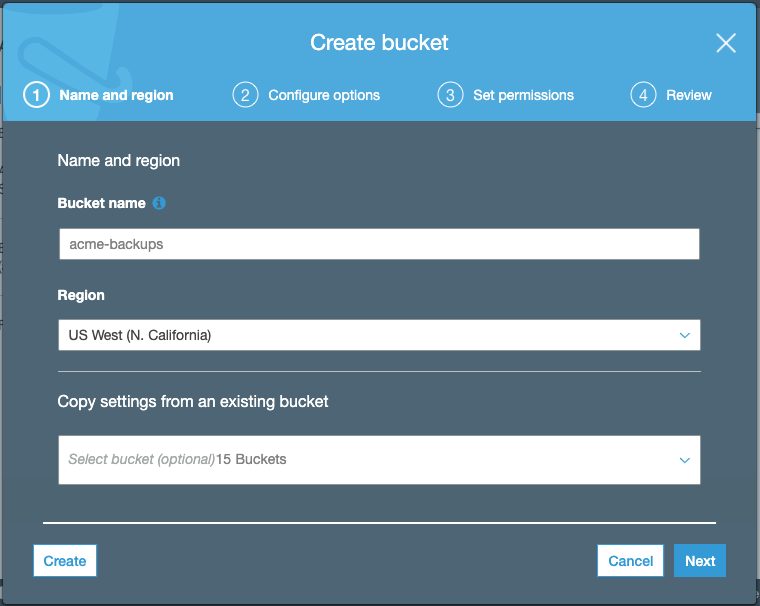
Keep default options for (2) Configure options, (3) Set Permission, review and create your bucket.
Information you'll need in step 3:
- Your "Bucket" name, in this case "myacme-backups"
- Your "Bucket" Region, in this case "US West - N. California"

2. Create your AWS credentials
In order to give access to your newly created bucket, you'll need to provide credentials to SimpleBackups. Follow this simple article on how to get your AWS S3 Credentials.
Information you'll need in step 3:
- Access Key
- Secret
3. Connect your S3 bucket to SimpleBackups
- Log into SimpleBackups and head to the connect your storage page
- In the storage provider list select "Amazon S3 Storage", and fill in the form with your AWS credentials and newly created bucket information
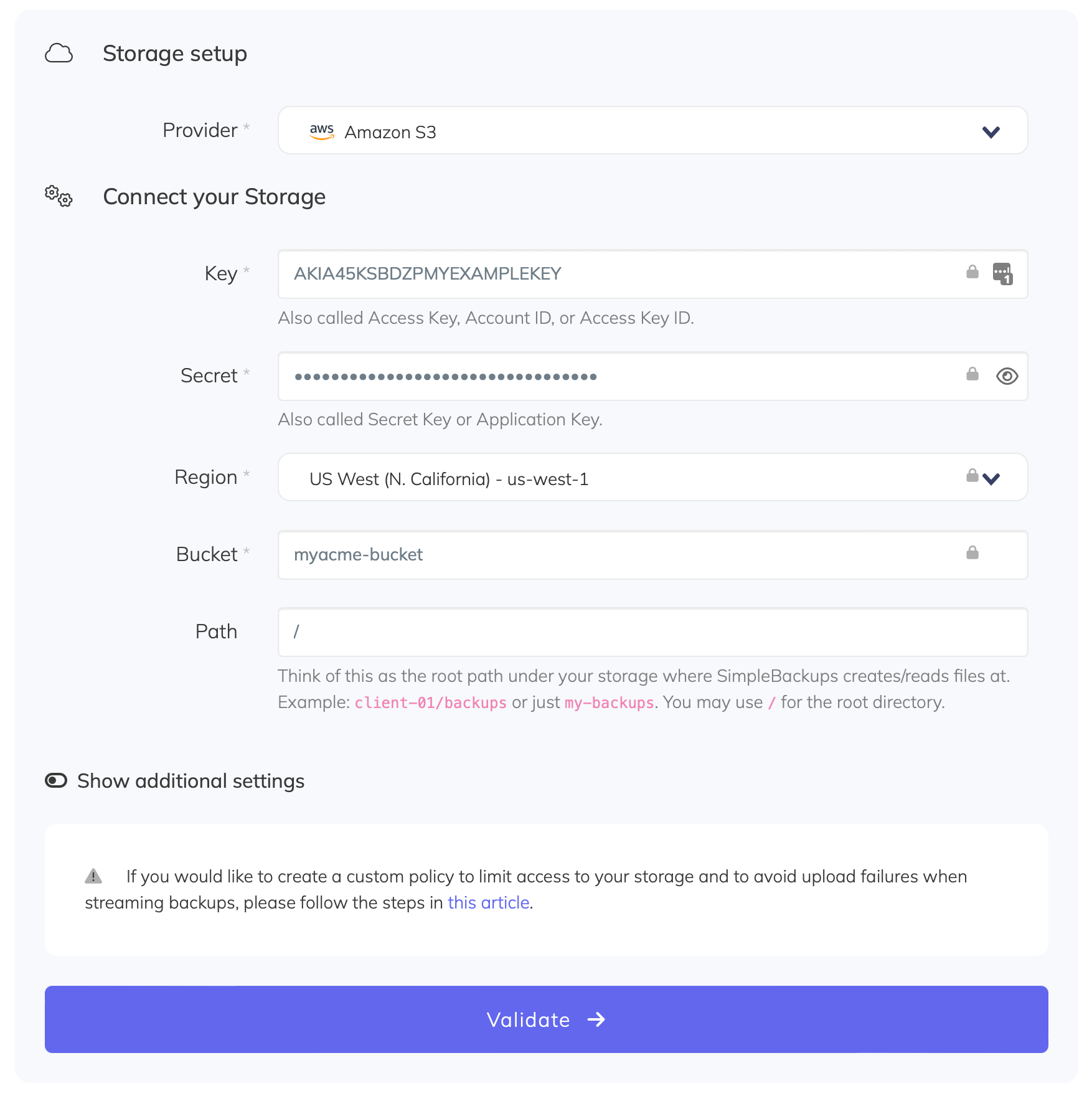
You'll have to input :
- Key: Access Key described in (step 2)
- Secret: Secret described in (step 2)
- Region: Bucket Region described in (step 1)
- Bucket: Bucket name described in (step 1)
- Give your storage a name (the bucket name is usually a good pick, but you can be creative) and click on "Save new storage".
You'll be redirected to the list of storage where you'll find your newly connected storage.
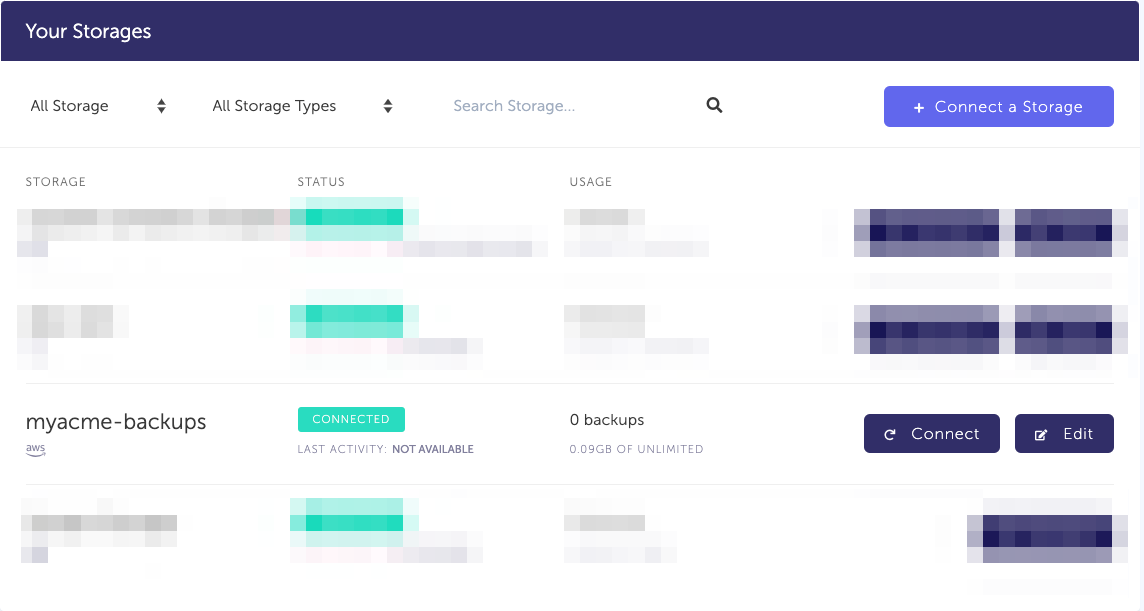
4. Final step: Create your PostgreSQL backup
Now it's time to head to the create backup page.
From this screen you'll be able to configure what data you're backing up (PostgreSQL in this case), where you want it to be saved (in this case your AWS S3 Bucket), and how often you want this to be done.
FYI this section will be the same, no matter what storage you pick. And that's the beauty of it, if you want to change storage, just select another one from the list (Backblaze, AWS, or whatever you might prefer) and you'll be good to go.
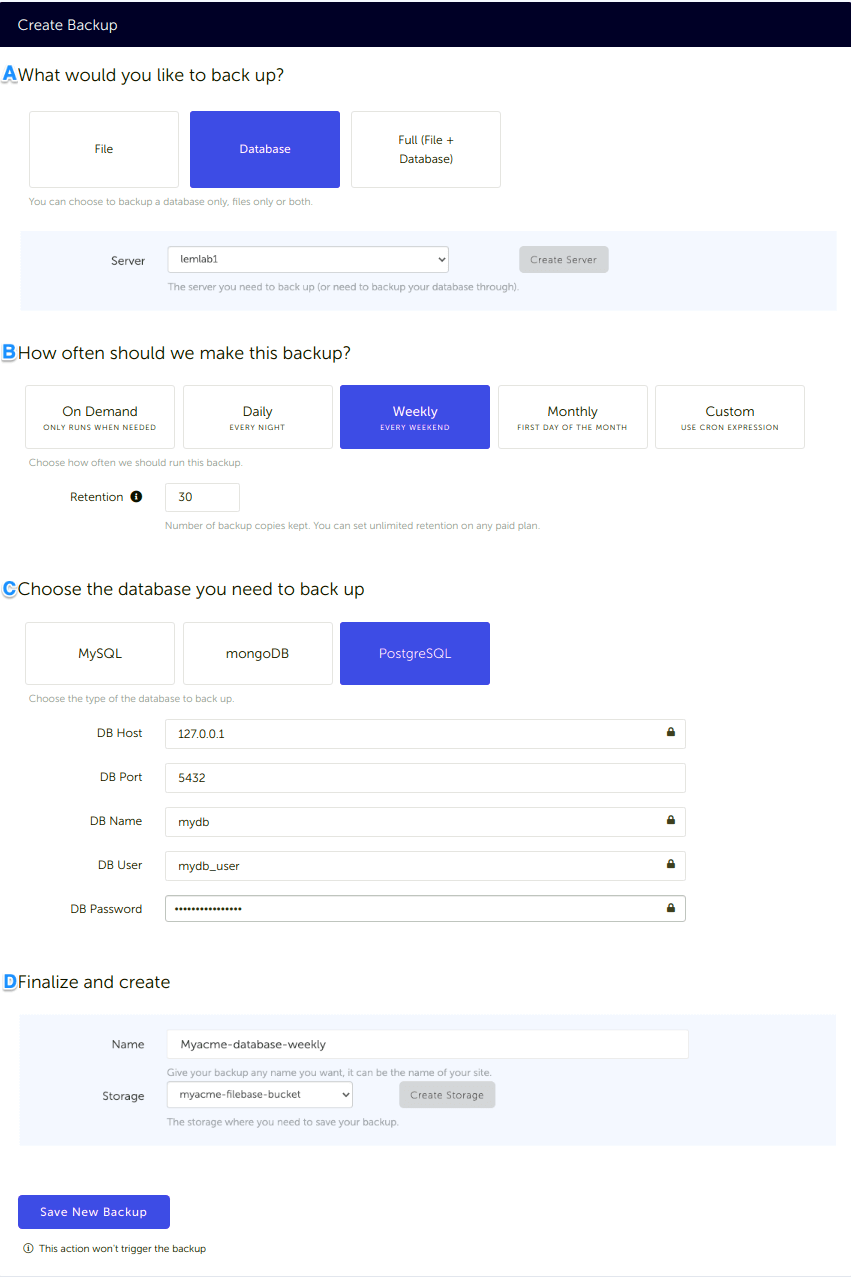
What would you like to back up? (A)
- Select "Database" (in this article we're creating a PostgreSQL backup only)
- Select the server on which your database is hosted
How often should we make this backup? (B)
-
Select your schedule option (here we picked a daily schedule)
You can select a pre-defined schedule (daily, weekly, monthly) or a custom option allowing you to schedule it whenever you want to use CRON syntax.
-
Example of CRON schedule for "20:00 every Tuesday" =
0 22 * * 2Finally, the "On demand" option won't schedule anything but will allow you to trigger the backup manually or using our API.
-
Define the backup retention, which is the number of backups you want to keep (kind of the history length of your backup if you prefer)
Choose the database you need to backup (C)
- Select the type of your database, in this case "PostgreSQL"
- Fill in the database connection form
Finalize and create (D)
- Pick the name of your backup (this is how it will be displayed in SimpleBackups interface) and where you want to store it.
- Select your Storage (step 3)
That's it, your PostgreSQL backup is now ready. Run it once manually (using the "Run" backup button from the backups list) and you'll trigger your first backup!
If you would rather script this yourself, the ultimate PostgreSQL backup script walks through the pg_dump and aws s3 sync version of the same pipeline, and the pg_dump and pg_restore guide covers the dump options in full. For a wider view of what else is available, PostgreSQL backup tools compared puts the main options side by side.
You can see the whole picture, including scheduling and restores, on the managed PostgreSQL backup page.
FAQ
Which AWS credentials does SimpleBackups need to write to S3?
An access key and secret for an IAM user or role scoped to the target bucket, plus the bucket name and its region. Grant only the permissions needed to write and list objects in that one bucket rather than full S3 access.
Where do I find my S3 bucket region?
The region is shown next to the bucket in the S3 console bucket list, for example us-west-1. SimpleBackups needs the region alongside the bucket name because the endpoint depends on it.
Does storing backups in S3 satisfy the 3-2-1 rule?
Partly. S3 gives you the off-site copy, but if the database also runs on AWS in the same account then a single account compromise reaches both. Use a separate account or a second provider for the copy that has to survive that.
How do I restore a PostgreSQL backup stored in S3?
Download the dump from the bucket, then restore it with psql for a plain SQL file or pg_restore for a custom-format archive. The restore guide covers both paths and the errors that come up most often.
This article is part of The complete guide to PostgreSQL backup, an honest, practical reference from the team that backs up PostgreSQL every day.