

Supabase PITR narrows your recovery point objective to seconds. Daily snapshots leave up to 24 hours of exposure. On that axis, PITR wins decisively.
But PITR doesn't back up your Storage buckets. It doesn't cover Edge Functions. It doesn't put your data in a different region or region-lock it for GDPR. And it costs extra, on top of the plan you're already paying for.
If you're evaluating whether to enable PITR, the real question isn't "how granular do I need my recovery point?" It's "what problem am I actually trying to solve?" This article walks through the decision end to end.
What PITR actually is (WAL replay, not a magic button)
PITR stands for Point-in-Time Recovery. On Supabase, it means your database continuously ships Write-Ahead Log segments to object storage. When you need to restore, the recovery process replays those WAL segments from a base snapshot to the exact moment you specify.
That's meaningfully different from a daily snapshot. A daily snapshot captures a single moment and holds it for your retention window. WAL replay captures every transaction, so you can target any moment within your retention window down to the second.
The "not a magic button" part: PITR is a database-level mechanism. It works at the Postgres layer, and only the Postgres layer. Everything outside Postgres, including Storage files, Edge Function code, and Supabase secrets, is not in the WAL.
How PITR works on Supabase
Supabase's native backups are physical snapshots of your Postgres volume. When PITR is enabled, Supabase also streams WAL segments to object storage in near-real time. Those segments sit on top of the base snapshot.
Recovery works in two stages:
- Supabase restores the most recent base snapshot taken before your target time.
- WAL segments are replayed forward from that base to your exact target timestamp.
From Supabase's PITR documentation, the recovery point granularity is approximately one second.
A few implementation details worth knowing:
- PITR is enabled per-project in the Supabase dashboard under Database settings.
- WAL archiving begins from the moment you enable it. You cannot retroactively recover to a time before PITR was turned on.
- The retention window for WAL data is separate from your daily backup retention. Check your plan for specifics.
- Restoring via PITR initiates from the Supabase dashboard or support channel, not the CLI.
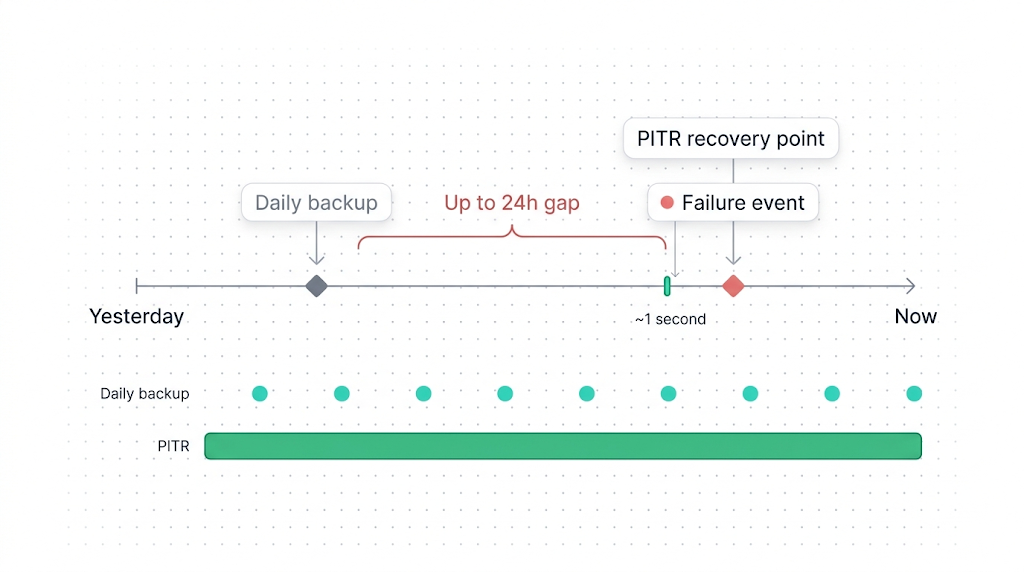
PITR vs. daily backups: what each gives you
The key difference is the recovery point objective (RPO): the maximum amount of data you can lose in a failure scenario.
With daily backups, your RPO is tied to when the last snapshot ran. If a failure happens at 11:58 PM and your snapshot runs at midnight, you've potentially lost nearly 24 hours of work. If it happens five minutes after the snapshot, you lose five minutes.
With PITR enabled, that ceiling drops to seconds. You can recover to 11:57:43 PM and lose almost nothing.
| Dimension | Daily backups | PITR |
|---|---|---|
| Recovery point (RPO) | Up to 24 hours | ~1 second |
| Recovery time (RTO) | Minutes to hours | Longer (WAL replay time scales with data volume) |
| Cost | Included in plan | Paid add-on |
| Postgres coverage | Yes | Yes |
| Storage buckets | No | No |
| Edge Functions | No | No |
| Off-site storage | No (same AWS region) | No (same region) |
| Restore mechanism | Dashboard | Dashboard / support |
| Retention window | 7–30 days by plan | Separate WAL window by plan |
The table has one non-obvious row: recovery time. PITR recovery is not necessarily faster than restoring from a daily snapshot. WAL replay takes longer the farther you are from the base snapshot. For a database with high write volume, replaying 18 hours of WAL takes longer than restoring a snapshot. If you need fast recovery (low RTO), PITR may actually be slower than daily backups for some scenarios.
The core tradeoff
PITR solves RPO. It makes the "how much data can I lose?" question nearly negligible. It does not solve RTO, off-site storage, cross-region compliance, or Storage backup. Those are separate problems.
When PITR is worth the cost
PITR earns its keep in a specific set of scenarios. The common thread: situations where losing hours of transactions is unacceptable, and the data being lost is Postgres data.
High-frequency write workloads. If your application writes hundreds or thousands of rows per minute, 24 hours of snapshot exposure means 24 hours of real user activity you cannot recover. An e-commerce order log, a SaaS activity feed, a financial ledger: any of these make daily snapshots feel too coarse.
Accidental bulk mutations. A developer runs an UPDATE without a WHERE clause. A job runs twice and creates duplicate records. PITR lets you target a recovery point precisely before the operation ran and avoid losing any legitimate data that arrived before or after it.
Regulatory requirements with strict RPO SLAs. Some compliance frameworks specify a maximum RPO in hours. If your RPO requirement is under 24 hours, daily backups may not satisfy the audit. PITR closes that gap.
Production data that's expensive or impossible to recreate. Some data flows only forward: user-generated content, behavioral events, financial transactions. If losing a day of that data has real business or legal consequences, PITR is the insurance.
PITR is most valuable when your Postgres data is the hard-to-replace part of your application. If you can reconstruct most lost records from a queue, a third-party API, or a partner feed, daily backups may be enough.
When daily backups (plus off-site) are enough
PITR is the right answer for a specific class of problem. For many projects, it isn't that class.
Low-write applications. A documentation site, a CMS with infrequent updates, a read-heavy API: if your database doesn't change much between snapshots, the RPO gap shrinks in practice. Losing up to 24 hours of data means losing a few rows, not a day's revenue.
Applications where the last-known-good state is the right recovery point. If you're restoring after a corrupted migration or a bad deployment, you're typically targeting a stable state from hours or days ago, not seconds ago. Daily snapshots serve that scenario well.
Projects that need off-site or cross-region backup. This is the one that surprises teams. PITR stores WAL segments in the same AWS region as your project. If your concern is regional availability (a data center going down) or compliance (data residency outside AWS us-east-1), PITR doesn't help. You need an off-site backup to a separate storage provider.
Projects with Storage buckets as the primary data surface. If your application is storage-heavy and the real risk is losing uploaded files, PITR addresses none of it. Supabase Storage is architecturally separate from Postgres. It doesn't appear in the WAL. See what Supabase's native backup doesn't cover for the full breakdown.
For most early-stage or mid-scale Supabase projects, a combination of daily snapshots and a verified off-site backup of Postgres gives more coverage per dollar than PITR alone.
What PITR costs on Supabase
Supabase plans and PITR pricing change, so treat the figures below as a starting point and verify against the current Supabase pricing page before making a budget decision.
| Plan | Monthly price | Daily backups | Retention | PITR |
|---|---|---|---|---|
| Free | $0 | No | 0 days | No |
| Pro | $25/mo | Yes | 7 days | Paid add-on |
| Team | $599/mo | Yes | 14 days | Usually included |
| Enterprise | Custom | Yes | 30 days | Usually included |
The PITR add-on for the Pro plan is priced on top of the base plan cost. The add-on cost increases with your database size, because larger databases generate more WAL volume.
One practical note: if you're on the Pro plan and evaluating the PITR add-on, run the numbers against what off-site backup via SimpleBackups or a managed alternative would cost. Depending on your database size and write frequency, an off-site approach may give you more coverage (including Storage and cross-region) for similar or lower cost.
What PITR doesn't cover
PITR is often treated as a complete backup solution. It isn't. Even with PITR fully enabled, these gaps remain:
Supabase Storage. File bytes in Storage buckets are not in Postgres. They live in a separate S3-compatible backend. The WAL knows nothing about them. A PITR recovery restores storage.objects metadata (the file records in Postgres), but the actual file bytes are unaffected. You recover to a point in time and find broken image URLs for files that no longer match the database records. This is the single most common PITR misconception we see. For complete coverage, you need a separate backup strategy for Storage.
Edge Functions. Deno Deploy code, environment variables, and secrets are not in Postgres. PITR doesn't touch them.
Off-site storage. WAL segments live in the same AWS region as your project. PITR doesn't give you a copy in a different cloud provider, a different region, or on your own infrastructure.
Cross-region compliance. If you need to prove that your backup data doesn't leave the EU (or another jurisdiction), PITR doesn't provide that guarantee. See cross-region Supabase backup for compliance for how to structure a compliant off-site approach.
PITR is Postgres-only. Storage, Edge Functions, and regional placement are all outside its scope. If your backup plan starts and ends with PITR, you have gaps.
What to do next
If your project has a strict RPO requirement, high write volume, and you can live with the regional placement and Postgres-only scope: enable PITR. The setup is a toggle in your project's database settings, and the coverage is real.
If your concern is more about Storage backup, cross-region redundancy, or off-site copies you control: PITR isn't the right tool. Start with what Supabase's native backup doesn't cover to map the gaps, then work through the cluster articles for Storage and off-site options.
If you've read this far, you probably already know whether native retention is enough for your project. If it isn't, SimpleBackups gives you cross-region off-site backup, automated verification, and a restore you can actually test.
Keep learning
- How Supabase native backup works, the physical snapshot mechanism behind daily backups, before you layer PITR on top.
- What Supabase's native backup doesn't cover, covering Storage, Edge Functions, and the off-site gap that PITR doesn't solve.
- How to back up Supabase Postgres, manual and managed off-site approaches for Postgres as a complement or alternative to PITR.
- Cross-region Supabase backup for compliance, for when data residency rules require a backup copy outside your primary AWS region.
FAQ
How much does Supabase PITR cost?
PITR is a paid add-on on Supabase Pro and Team plans. The price depends on database size and changes over time. Check Supabase's pricing page for current figures. Enterprise plans typically include PITR.
Can I enable PITR on the free tier?
No. PITR is only available on paid Supabase plans. Free tier projects do not receive daily backups or PITR.
Does PITR back up Supabase Storage?
No. PITR operates at the Postgres layer via Write-Ahead Log replay. Supabase Storage files live in a separate S3-compatible backend outside Postgres, so WAL replay doesn't cover them.
What's the maximum retention window for PITR on Supabase?
Retention windows vary by plan and are subject to change. Check the current limits in your Supabase dashboard or the official documentation.
Can I restore to a specific second with PITR?
Yes. Supabase PITR recovery targets a timestamp with approximately one-second granularity. WAL segments are replayed from the nearest preceding base snapshot up to the exact moment you specify.
Does PITR slow down my database?
WAL archiving adds a small background I/O overhead. For most production workloads this is negligible. Supabase manages the archiving process automatically.
Is PITR included with the Enterprise plan?
Enterprise plans typically include PITR, but the specific terms depend on your contract. Confirm with Supabase directly.
This article is part of The complete guide to Supabase backup, an honest, practical reference from the team that backs up Supabase every day.