

Supabase's native backup is managed inside Supabase's platform. That is the right default for fast recovery, but compliance frameworks usually want something different: an independent copy, in a region and provider you choose, that you can point to when an auditor asks where your backup data physically lives. That answer matters for SOC 2, GDPR, and ISO 27001.
This article explains what auditors actually check about backup location, and how to set up cross-region Supabase backup that satisfies data residency requirements. By the end, you'll have a working off-site replication setup and a clear picture of what to put in your BCDR documentation.
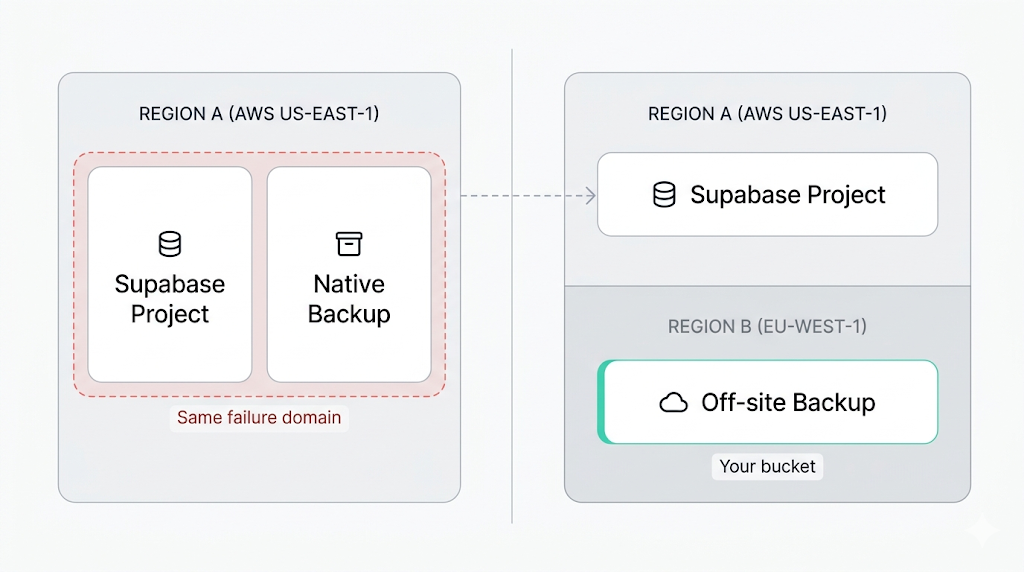
Why region matters for backup
Keeping backup and production in the same region creates two distinct problems.
- Reliability. A regional failure (power, networking, an AWS incident) can affect your live database and your backup simultaneously. Supabase's infrastructure is resilient within a region, but resilient and geographically redundant are not the same thing.
- Compliance. Most compliance frameworks treat "same region, same provider" as a single failure domain, not as off-site backup. An auditor reviewing your backup posture will flag a backup that lives in the same blast radius as production.
The coverage gap in Supabase's native backup is documented in detail elsewhere in this cluster. The short version: native backup covers Postgres (physical snapshot only), and leaves Storage objects and Edge Functions out entirely. Any cross-region strategy needs to account for all three components, not just the database.
What native backup gives you, and what to add
Supabase's native backup documentation describes daily snapshots managed by Supabase, with retention set by your plan. Backups are handled for you inside the platform, which suits fast recovery. A copy in a storage account you control, in a region you choose, is something you add yourself.
Native backups are physical volume snapshots managed by Supabase, so an independent, portable copy comes from a logical dump such as pg_dump.
The how Supabase native backup works article goes into detail on the snapshot mechanism and retention windows. For compliance purposes, the relevant question is whether you hold an independent copy: in a region and provider you choose, with its location documented.
Native backup alone is a reasonable baseline for projects that aren't subject to compliance audits. If a framework requires off-site backup or auditable data residency, add an independent copy you control.
What auditors actually ask about backup location
What auditors actually ask
Three questions surface in almost every backup-related audit section: "Do you have an off-site copy of your data?" "Have you tested a restore from that copy?" "Where does the backup data physically reside, and how is that residency documented?" If you cannot answer all three clearly, the auditor marks a gap.
The table below maps the major compliance frameworks to what they actually require from your backup posture:
| Framework | Off-site backup required? | Geographic requirement | Tested restores required? | Documentation required? |
|---|---|---|---|---|
| SOC 2 | Yes (CC9.1, A1.2) | None specified | Yes | Yes |
| GDPR | Indirectly (Article 32) | Transfers need adequacy or SCCs | Implied by Article 32 | Yes |
| ISO 27001 | Yes (A.12.3.1, A.17.1.2) | None specified | Yes | Yes |
A few things worth unpacking.
SOC 2 doesn't specify which region your backup lives in. It cares that the backup is separated from production and that you've verified it restores. A backup in the same region as your database fails on separation.
GDPR is frequently misread on this point.
GDPR does not require backups to be stored in the EU. It requires that any transfer of personal data outside the EU (or to countries without an EU adequacy decision) be covered by Standard Contractual Clauses or another approved mechanism. If your Supabase project is in eu-central-1 and you replicate backups to eu-west-1, no SCCs are needed. If you replicate to us-east-1, you need to document the legal basis for that transfer. Choose your destination region accordingly, and document whichever path you take.
ISO 27001 follows a similar pattern to SOC 2: off-site, tested, documented. No geographic mandate beyond what GDPR adds for personal data.
Setting up cross-region off-site backup
The goal is to move data from Supabase to a storage bucket you control, in a region of your choosing. The two primary components are Postgres and Storage. Edge Functions are backed up separately: SimpleBackups covers function code, and the manual route uses the Supabase CLI. This section focuses on Postgres and Storage.
Postgres backup
For Postgres, the standard path is pg_dump over the direct connection, followed by uploading the resulting file to your destination bucket. The full Supabase Postgres backup guide covers the complete setup. The region that matters for compliance is the destination bucket's region, not where the dump script runs.
A working example:
# Dump and upload to a cross-region S3 bucket
pg_dump --format=custom --file="/tmp/backup-$(date +%F).dump" "$SUPABASE_DB_URL"

aws s3 cp "/tmp/backup-$(date +%F).dump" "s3://your-backup-bucket/postgres/backup-$(date +%F).dump" --region eu-west-1 --sse AES256
Set $SUPABASE_DB_URL to your project's direct connection string (not the pooler, for pg_dump), found in the Supabase dashboard under Project Settings > Database. It includes your database password, so keep it in a secrets manager or CI secret. Replace eu-west-1 with your target compliance region.
Storage backup
Supabase exposes an S3-compatible API for Storage. You can sync Storage bucket contents using rclone configured against your project's Storage credentials:
# Sync Supabase Storage to a cross-region bucket
rclone sync supabase:your-storage-bucket r2:your-backup-bucket/storage/ --progress --transfers 20
Configure the supabase rclone remote with the endpoint https://[project-ref].supabase.co/storage/v1/s3, your Storage access key, and your secret key from the Supabase Storage API settings. The r2 remote is Cloudflare R2 in this example; substitute your preferred provider. See the Supabase Storage backup guide for the full rclone configuration.
Choosing a target region and storage provider
The right backup destination depends on your compliance context and your tolerance for egress costs.
| Provider | Regions | Egress cost | Notes |
|---|---|---|---|
| Amazon S3 | 30+ regions globally | ~$0.09/GB | Most auditor-familiar; fine-grained IAM and access logging |
| Cloudflare R2 | Global (no region picker) | $0 | No egress fees; good for high-volume backups |
| Wasabi | US, EU, AP, CA | $0 | S3-compatible; flat monthly storage pricing |
| Backblaze B2 | US East, EU Central | $0.01/GB | S3-compatible; cheapest per-GB option |
Three rules of thumb cover most cases.
- GDPR, project in an EU region: keep the backup in the EU. Options include AWS
eu-west-1oreu-central-1, Wasabieu-central-1, or Backblaze B2 EU Central. This sidesteps the SCC question entirely. - SOC 2 only: geographic location doesn't matter for compliance. Pick based on cost and provider separation. Using a different cloud provider than AWS adds a second failure domain that auditors recognize as genuine separation.
- Both GDPR and SOC 2: prioritize the GDPR region constraint and document the decision. One paragraph in your BCDR policy explaining why you chose the specific region is usually enough.
Automating cross-region replication
A one-time backup proves you can do it. A scheduled backup proves your process is reliable. Auditors care about process continuity, not heroics.
The simplest reliable setup is a cron job on a dedicated server outside Supabase's infrastructure:
# /etc/cron.d/supabase-cross-region-backup
0 3 * * * backup-user /opt/scripts/supabase-backup.sh >> /var/log/supabase-backup.log 2>&1
The script should cover four steps: run pg_dump and stream the output to the destination bucket; sync Storage objects via rclone; log success or failure with a timestamp; alert on failure via email, Slack webhook, or your on-call tool of choice.
The alert on failure is the step most teams skip. Backups that silently stop running don't surface in monitoring until an audit or an incident.
Run your backup script from a server in the target region rather than from your Supabase project region. This cuts cross-region data transfer costs and keeps egress charges predictable. A small VM in eu-west-1 running the backup nightly is cheap; paying Supabase outbound bandwidth for 20 GB of database dumps every night adds up across a year.
Documenting your backup process for an audit
The backup setup is the technical work. The documentation is what passes the audit.
Most backup-related audits ask for a Business Continuity and Disaster Recovery (BCDR) document or equivalent. At minimum, yours should cover:
- Backup schedule (frequency, retention window).
- Backup location (region, provider, bucket name or ARN).
- What is covered (Postgres, Storage, Edge Functions) and what is excluded and why.
- Recovery procedure (step-by-step restore process, not just "restore from backup").
- Most recent tested restore: date, what was restored, how long it took.
The GDPR-compliant Supabase backup guide goes deeper on the GDPR-specific documentation requirements, including how to document adequacy decisions and SCCs for cross-border replication.
For SOC 2 and ISO 27001, the five points above cover the core ask. The restore test entry is the one most teams leave blank. Schedule one now, document it, and repeat every quarter. A backup you've never tested is not evidence of a working recovery process, and auditors know the difference.
What to do next
- Starting from zero: set up the
pg_dumppipeline to a bucket in a different region first. That covers your Postgres database and satisfies the off-site copy requirement for SOC 2 and ISO 27001. Layer in Storage replication with rclone next, then write a one-page BCDR doc. - Already backing up in the same region as your project: update the destination bucket to a compliant region, verify the region appears in your audit logs, and update your documentation to reflect the change.
In both cases, the restore test is the step most teams defer indefinitely. Don't. Run it before your next audit, not the week before.
SimpleBackups for Supabase complements Supabase's native backups. If you want off-site Postgres, Storage, and Edge Functions backups in a region you choose, with scheduling, failure alerts, and logs you can hand an auditor, that's what it does.
Keep learning
- How Supabase native backup works: the snapshot mechanism, retention windows, and what you can and can't restore.
- What Supabase's native backup doesn't cover: Storage, Edge Functions, and the multi-region gap.
- How to back up Supabase Postgres: the full pg_dump setup, connection strings, and scheduling.
- How to back up Supabase Storage: backing up Storage objects via the S3-compatible API and rclone.
FAQ
Is Supabase's native backup enough for off-site backup requirements?
Native backups are managed inside Supabase's platform. Auditors usually want an independent copy, in a region and provider you control, with its location documented. An off-site backup to your own bucket gives you that.
Does GDPR require backups to be stored in the EU?
No, not directly. GDPR requires that transfers of personal data to countries outside the EU without an adequacy decision be covered by Standard Contractual Clauses. Keeping backups within the EU is the simplest approach, but replicating to a non-EU region is possible with documented SCCs.
What compliance frameworks require off-site backup?
SOC 2 (CC9.1, A1.2), ISO 27001 (A.12.3.1, A.17.1.2), and GDPR (Article 32) all require or strongly imply off-site backup. SOC 2 and ISO 27001 additionally require documented, tested restores.
How do I document my backup process for a SOC 2 audit?
Document your backup schedule, destination region and provider, what is covered and excluded, your step-by-step restore procedure, and the date and outcome of your most recent tested restore. A one-page BCDR policy covering these five points is typically sufficient for SOC 2 CC9.1 evidence.
Does SimpleBackups support cross-region Supabase backup?
Yes. SimpleBackups backs up your Supabase Postgres database, Storage objects and Edge Functions to a destination you control, including buckets in a different region or on a different cloud provider. You configure the destination; SimpleBackups handles scheduling, execution, failure alerting, and access logs.
This article is part of The complete guide to Supabase backup, an honest, practical reference from the team that backs up Supabase every day.