

You restore your Supabase project from last night's backup. The database comes back clean. Your Storage objects are another story, but at least the data is there. Then you check your Edge Functions. The list is empty. Every function you deployed over the last six months is gone.
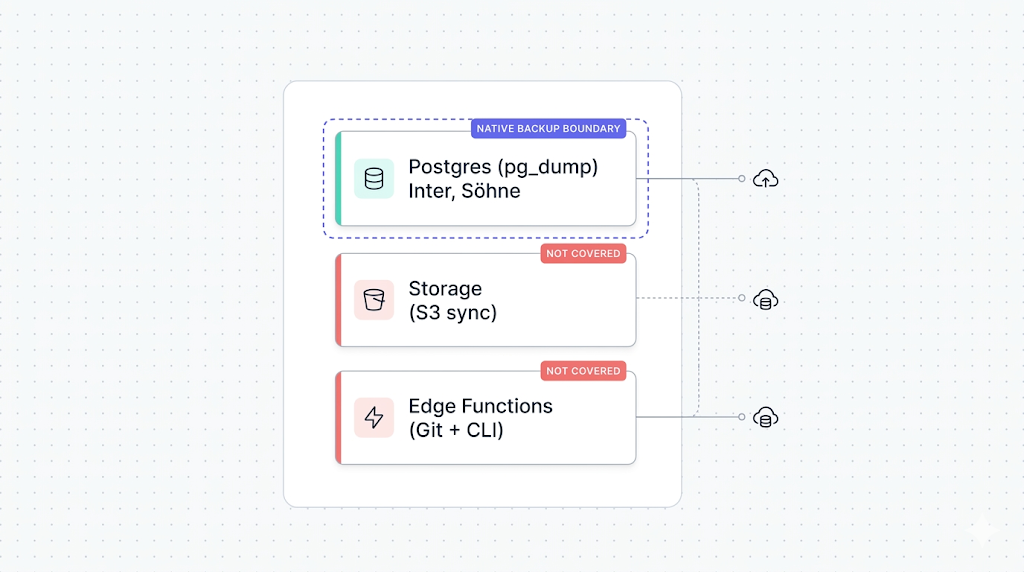
This is not a Supabase bug. It's a gap that the backup docs don't make obvious: native backup only covers your Postgres volume. Everything built on top of it — including Edge Functions — is your responsibility.
What Supabase's native backup doesn't cover names this as the second major blind spot after Storage. This guide is the backup walkthrough for that blind spot. By the end you'll know what to back up, how to do it today without extra tooling, and how to automate it so you don't have to think about it again.
Why Edge Functions aren't in the native backup
Supabase's native backup is a physical snapshot of your Postgres volume. It captures what lives on that volume: your tables, indexes, schemas, extensions, RLS policies, and the storage.objects metadata table.
Edge Functions don't live on the Postgres volume. They run on Deno Deploy, Supabase's serverless Deno runtime. The function source code, the deployment configuration, and the secrets you've attached to those functions all live in a separate infrastructure layer that the physical snapshot never touches.
The Supabase docs on Edge Functions describe the architecture clearly: you deploy functions via the CLI or Dashboard, they run on Deno Deploy, and their environment is managed separately from your database. For a deeper look at what the physical snapshot actually captures, how Supabase's native backup works walks through the full picture.
The practical result: restore a backup, and you get your Postgres data back. Your Edge Functions are gone unless you kept them somewhere else.
What to back up: code, config, and secrets
Edge Functions have three distinct backup surfaces. Each one requires a different approach.
| Surface | What it contains | Where it lives | How to back it up |
|---|---|---|---|
| Source code | .ts / .js function files, shared modules | Your filesystem | Git |
| Config | Function names, slugs, deploy settings | Supabase project | supabase functions list + CLI export |
| Secrets | Environment variable values | Supabase secrets store | Manual documentation only |
The source code is the easiest surface to protect. Config is more work but automatable. Secrets are the hardest, and the part most teams skip until they lose them.
Versioning your function code with Git
If your function code is already in a Git repository, you have a backup for this surface. The Supabase CLI convention is to keep functions in a supabase/functions/ directory at your project root, with one subdirectory per function.
supabase/
  functions/
    send-welcome-email/
      index.ts
    process-webhook/
      index.ts
    _shared/
      cors.ts
      utils.ts
If you initialized your project with the CLI (supabase init), this structure is already in place. If you've been creating functions via the Dashboard and haven't pulled them locally, do that now.
Pull your deployed function code with:
supabase functions download <function-name> --project-ref <your-project-ref>
Run that for each function, commit everything to a private repository, and push to a hosted remote (GitHub, GitLab, Bitbucket). That's a complete source-code backup.
Pull and commit regularly, not just when you remember. A deployment from the Dashboard won't automatically update your local files. If your team deploys via the Dashboard without committing, your Git history drifts from production within days.
Once the code is in Git, you also get versioned rollback for free: if a bad deploy breaks a function, git diff shows you exactly what changed and git revert gets you back.
Exporting function config and environment variables
Your Git repository holds the function code. It doesn't hold the deployment config: which functions exist, what their slugs are, whether they have JWT verification enabled, and which secrets they reference by name.
List your deployed functions with:
supabase functions list --project-ref <your-project-ref>
The output looks like this:
┌─────────────────────┬───────────────┬───────────────────────────┐
│ Name                │ Version       │ Created At                │
├─────────────────────┼───────────────┼───────────────────────────┤
│ send-welcome-email  │ 3             │ 2026-01-14T08:32:11.000Z  │
│ process-webhook     │ 7             │ 2026-02-03T15:20:44.000Z  │
│ generate-pdf        │ 1             │ 2026-03-29T10:05:22.000Z  │
└─────────────────────┴───────────────┴───────────────────────────┘
Capture this in a script that writes to a file you commit alongside your function code. A minimal wrapper:
#!/bin/bash
# backup-functions-config.sh
# Run from your project root. Requires SUPABASE_PROJECT_REF in env.

set -euo pipefail

OUTPUT_FILE="supabase/functions/functions-manifest.json"

supabase functions list --project-ref "$SUPABASE_PROJECT_REF" --output json > "$OUTPUT_FILE"

echo "Functions manifest written to $OUTPUT_FILE"
Commit functions-manifest.json to your repository. After a restore, you have a record of exactly which functions existed and when they were last updated.
You can also check the supabase/config.toml in your project. It captures function-level settings like verify_jwt per function. If you're using the CLI workflow, this file should already be in your repository.
Backing up secrets (the part most people miss)
This is where most teams have a gap they don't know about.
Supabase secrets are the environment variables you attach to Edge Functions. You set them with supabase secrets set KEY=value. You can list them with supabase secrets list. What you cannot do is export the values.
supabase secrets list --project-ref <your-project-ref>
┌─────────────────────┬─────────────────────────┐
│ Name                │ Updated At               │
├─────────────────────┼─────────────────────────┤
│ RESEND_API_KEY      │ 2026-01-14T08:32:11.000Z │
│ STRIPE_WEBHOOK_SECRET│ 2026-02-03T15:20:44.000Z│
│ OPENAI_API_KEY      │ 2026-03-29T10:05:22.000Z │
└─────────────────────┴─────────────────────────┘
The CLI shows you the names. It does not show you the values.
As of the current Supabase CLI and Management API, there is no way to export secret values programmatically. The values exist only inside Supabase's secrets store. If you lose access to the original sources (your password manager, your CI secrets, your team's shared vault), you cannot recover them from a Supabase backup or export.
The only reliable backup for secrets is to store the values somewhere you control: a secrets manager (AWS Secrets Manager, HashiCorp Vault, Doppler, 1Password), a .env.production file in a private encrypted store, or your CI/CD platform's secret storage (GitHub Actions secrets, GitLab CI variables).
A practical step to take today: open supabase secrets list, open your secrets manager, and verify that every secret Supabase knows about is documented with its current value somewhere you control. If a name appears in Supabase but you can't find the value, treat that as a missing backup and rotate the secret from its source so you have a fresh known value stored.
Document the secret names in your repository even if you can't store the values:
# supabase/functions/.secrets.example
# This file documents which secrets Edge Functions expect.
# Values are managed in [your-team-vault]. Do not commit actual values.

RESEND_API_KEY=
STRIPE_WEBHOOK_SECRET=
OPENAI_API_KEY=
This gives a future you (or a new teammate rebuilding after a restore) a complete checklist of what to restore, even if the values come from outside Supabase.
Automating Edge Function backups
Source code in Git handles itself if your team has a discipline of committing before deploying. The config export is where automation pays off.
A complete daily backup script:
#!/bin/bash
# backup-edge-functions.sh
# Run daily via cron or CI. Requires Supabase CLI installed and authenticated.

set -euo pipefail

PROJECT_REF="${SUPABASE_PROJECT_REF:?SUPABASE_PROJECT_REF must be set}"
BACKUP_DIR="supabase/functions"
DATE=$(date -u +%Y-%m-%dT%H:%M:%SZ)

echo "[$DATE] Starting Edge Functions backup for project $PROJECT_REF"

# 1. Pull current function source from Supabase (catches Dashboard-only deploys)
mkdir -p "$BACKUP_DIR"

for fn in $(supabase functions list --project-ref "$PROJECT_REF" --output json | jq -r '.[].name'); do
  echo "  Downloading function: $fn"
  supabase functions download "$fn" --project-ref "$PROJECT_REF" --output "$BACKUP_DIR/$fn" 2>/dev/null || echo "  [warn] Could not download $fn — may require manual pull"
done

# 2. Export function manifest
supabase functions list --project-ref "$PROJECT_REF" --output json > "$BACKUP_DIR/functions-manifest.json"

# 3. Export secret names (values must be managed separately)
supabase secrets list --project-ref "$PROJECT_REF" --output json > "$BACKUP_DIR/secrets-manifest.json"

echo "[$DATE] Edge Functions backup complete."
echo "  Commit and push $BACKUP_DIR to your remote repository."
Run this from a cron job on a server that has the Supabase CLI installed and authenticated via SUPABASE_ACCESS_TOKEN. Or run it as a scheduled CI/CD job (GitHub Actions, GitLab CI, CircleCI) that commits the output to a private backup branch.
A weekly GitHub Actions workflow that does this:
# .github/workflows/backup-edge-functions.yml
name: Backup Edge Functions

on:
  schedule:
    - cron: "0 3 * * 0" # Every Sunday at 03:00 UTC
  workflow_dispatch:

jobs:
  backup:
    runs-on: ubuntu-latest
    steps:
      - uses: actions/checkout@v4
        with:
          token: ${{ secrets.GH_PAT }}

      - name: Install Supabase CLI
        run: npm install -g supabase

      - name: Run Edge Functions backup
        env:
          SUPABASE_ACCESS_TOKEN: ${{ secrets.SUPABASE_ACCESS_TOKEN }}
          SUPABASE_PROJECT_REF: ${{ secrets.SUPABASE_PROJECT_REF }}
        run: bash ./scripts/backup-edge-functions.sh

      - name: Commit updated backup
        run: |
          git config user.name "github-actions[bot]"
          git config user.email "github-actions[bot]@users.noreply.github.com"
          git add supabase/functions/
          git diff --staged --quiet || git commit -m "chore: edge functions backup $(date -u +%Y-%m-%d)"
          git push
What we see in practice
We run Supabase backups every day. The teams that recover cleanly from a project restore are the ones who treat their supabase/functions/ directory the same way they treat src/: committed, reviewed, and deployed from version control. The teams who struggle are the ones who built functions entirely through the Dashboard and never pulled them locally.
What to do next
If you've read this far, you know the three surfaces. Here's the short version of what to do tonight:
- Run
supabase functions downloadfor every function and commit the output to a private repository. - Add the config export script as a weekly CI job.
- Open
supabase secrets list, cross-reference it with your secrets manager, and fill any gaps.
The database and Storage sides of your Supabase project need the same treatment. Backing up Supabase Storage covers the S3-sync path for file bytes. Backing up Supabase Postgres covers pg_dump and off-site storage for the database itself. A complete Supabase backup strategy needs all three.
If you want to see the full picture of what native backup covers versus what a managed service adds, Supabase native backup vs. SimpleBackups puts both options side by side across every surface, including cost.
If scripting and scheduling all this yourself sounds like a second job, SimpleBackups handles Supabase Postgres, Storage, and Edge Functions backups off-site, with alerts when a run fails. See how it works →
Keep learning
- What Supabase's native backup doesn't cover — the full gap map: Postgres, Storage, Edge Functions, secrets
- How Supabase's native backup works — what's in the physical snapshot and what isn't
- Supabase Edge Functions docs — deployment, config, and secrets management from the source
- Backing up Supabase Storage — the S3-sync approach for your file bytes
FAQ
Does Supabase back up my Edge Functions automatically?
No. Supabase's native backup captures a physical snapshot of your Postgres volume only. Edge Functions run on Deno Deploy, a separate infrastructure layer not included in that snapshot. Function source code, deployment config, and attached secrets are not backed up unless you take action yourself.
Can I export Edge Function secrets via the Supabase CLI?
No. The Supabase CLI shows you the names of your secrets but does not expose the values. As of the current CLI and Management API, there is no way to export secret values programmatically. Store secret values in a secrets manager or CI/CD secret store you control separately from Supabase.
What happens to my Edge Functions if I restore a database backup?
Your Postgres data is restored; your Edge Functions are not. The restore process operates on the Postgres volume only. If you are restoring to a new or replaced project, functions do not carry over automatically and must be redeployed.
Do I need to redeploy Edge Functions after a project restore?
If you are restoring your existing project in place, your deployed Edge Functions should still be present since they live outside the Postgres volume. If you are recreating a project from scratch, you will need to redeploy every function using the Supabase CLI.
How do I version Edge Functions if I'm not using Git?
Pull your function code locally with 'supabase functions download', then store those files in any versioned storage you control: a private object storage bucket with versioning enabled, or a self-hosted code repository. Git is the natural fit since the Supabase CLI is built around it.
Are Edge Function logs backed up?
No. Edge Function logs are not included in Supabase's native database backups, and there is no built-in tool to export historical logs once they pass the retention window. If log retention is required for your compliance posture, you must use the Log Drains feature to export them to an external observability platform.
This article is part of The complete guide to Supabase backup, an honest, practical reference from the team that backs up Supabase every day.