

Your Supabase Postgres database has daily backups on a Pro plan. They run automatically. You have never had to think about them. Then you need to copy a snapshot to a staging environment, and the dashboard tells you: this backup is not downloadable. It restores to the same project, in the same region, through Supabase's own infrastructure. It isn't a file you can get to.
That's expected behavior, not a bug. Supabase's native backup is a physical volume snapshot, not a pg_dump. It doesn't produce a portable file, and you can't access it directly. For portability, cross-region copies, or retention longer than 30 days, you need a logical backup you own.
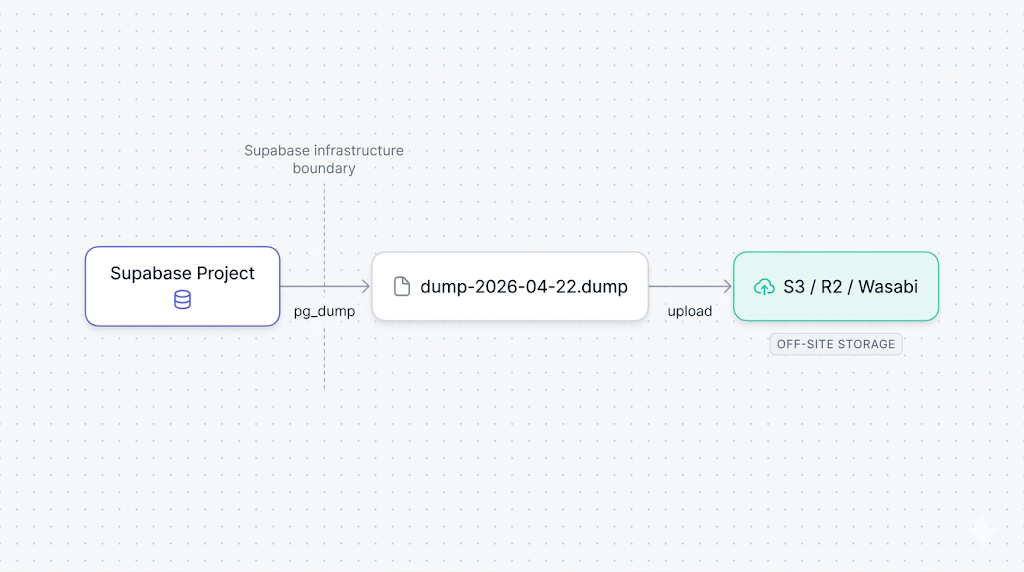
This guide walks through three paths to backup your Supabase Postgres database: pg_dump directly, the Supabase CLI, and an automated scheduled job that ships the dump to off-site storage. You'll also find the verification steps that tell you whether the file is actually usable, before you need it.
Why you need a logical backup on top of native snapshots
Supabase's Pro plan includes 7-day retention of daily physical snapshots, according to the Supabase backups documentation. Team gets 14 days; Enterprise gets 30; Free gets nothing. Those are the bounds.
The snapshots are physically coupled to your project infrastructure. You can't download them, inspect them, or restore them to a different cloud. If you need to migrate off Supabase, restore to a staging environment, keep an archive beyond 30 days, or store a copy under credentials you control, native backup alone doesn't cover it.
For the full list of what those snapshots miss, what Supabase's native backup doesn't cover goes through every gap: off-site storage, long-term retention, portability, Storage buckets, Edge Functions, and compliance framing. The short version: a logical backup fills the gaps native was never designed to fill.
Prerequisites: connection string, pg_dump version, and disk space
Before you run anything, you need three things in order.
A database connection URL that works with pg_dump. Supabase gives you three connection strings, and the distinction matters here. The direct connection (port 5432 on db.[project-ref].supabase.co) works but is IPv6-only, so it fails on IPv4-only CI runners. The session pooler (port 5432 on the pooler hostname) also works with pg_dump and is reachable over IPv4, which makes it the safer default for automated jobs. The one to avoid is the transaction pooler (port 6543): it breaks pg_dump's COPY protocol and will cause a hang or a protocol error.
Find your direct URL in your project settings under Settings > Database > Connection string. It follows this format:
postgresql://postgres:[password]@db.[project-ref].supabase.co:5432/postgres
If you normally use the transaction pooler string (port 6543) for your application, switch to the session pooler or direct connection (both port 5432) for pg_dump. The 5432/6543 ports are easy to confuse in the Supabase dashboard.
A matching pg_dump version. The client must be within one major version of the server. Supabase projects run Postgres 15 or 16 (check your project settings under Settings > Infrastructure). Running pg_dump --version locally tells you what you have. A version mismatch produces: aborting because of server version mismatch.
To install the right client on Ubuntu or Debian:
sudo apt-get install postgresql-client-16
On macOS with Homebrew:
brew install postgresql@16
Enough local disk space. A --format=custom dump compresses to roughly 10-20% of the raw data size. A 10 GB database produces about 1-2 GB on disk. A 100 GB database, roughly 15-20 GB. Check with df -h before you start on a large project.
Backing up with pg_dump (manual, one-liner)
The minimal working command to backup Supabase Postgres:
pg_dump
  --format=custom
  --file=dump-$(date +%F).dump
  "postgresql://postgres:[password]@db.[project-ref].supabase.co:5432/postgres"
The flags that matter:
--format=custom: produces a compressed binary file. This format supports parallel restore withpg_restore -jand selective restore of individual tables or schemas.--file: writes to a named file instead of stdout. Writing to stdout on a large database introduces pipe fragility you don't want.$(date +%F): stamps the filename with today's date (dump-2026-04-22.dump). Without it, the next run overwrites the previous file silently.
If you want to exclude Supabase's internal schemas (auth, storage, realtime) and dump only your application data:
pg_dump
  --format=custom
  --exclude-schema=auth
  --exclude-schema=storage
  --exclude-schema=realtime
  --file=dump-$(date +%F).dump
  "postgresql://postgres:[password]@db.[project-ref].supabase.co:5432/postgres"
Add --no-owner --no-acl when you intend to restore into a fresh Supabase project. Without them, the restore will fail on the first ALTER TABLE ... OWNER TO statement that references a role the target project doesn't have.
For the foundational reference on every pg_dump flag and format, our pg_dump and pg_restore guide covers the full option set. The Supabase-specific wrinkles (pooler vs. direct, schema filtering, role handling) are what this article adds.
| Method | Format | Portable | Selective restore | Relative size |
|---|---|---|---|---|
--format=custom | Binary | Yes | Yes, with pg_restore | ~10-20% of raw |
--format=plain | SQL text | Yes | Manual with psql | ~100% of raw |
--format=directory | Folder | Yes | Yes, parallel-ready | ~10-20% of raw |
For most use cases, --format=custom is the right choice. --format=plain makes sense only when you want a human-readable SQL file to inspect or diff before a migration.
Backing up with the Supabase CLI
The Supabase CLI's db dump subcommand wraps pg_dump with Supabase-aware defaults. It handles the schema filtering and outputs a plain SQL file ready to re-import.
Install the CLI if you haven't:
npm install -g supabase
Run the dump:
supabase db dump
  --db-url "postgresql://postgres:[password]@db.[project-ref].supabase.co:5432/postgres" -f dump-$(date +%F).sql
The CLI produces a plain SQL file, not the custom binary format. That's intentional: the output is readable, diffable, and loadable with psql on any Postgres instance. The tradeoff is size: plain SQL is 5-10x larger than custom format, and it doesn't support pg_restore's parallel restore.
For an archive you plan to inspect or run through a diff tool before a migration, the CLI path is the right one. For a compressed archive you plan to restore at speed, pg_dump --format=custom is faster and smaller.
The Supabase CLI defaults to including all schemas. Pass --schema public to filter to your application tables only, excluding auth, storage, and realtime.
You can also connect the CLI to a Supabase project by its reference ID instead of a full connection string, which is convenient when you manage several projects from one machine.
Automating the backup on a schedule
A manual dump you run once isn't a backup strategy. You need the dump running automatically, writing to a timestamped file, and failing loudly when something goes wrong.
The simplest setup is a cron job on a server or CI runner that is separate from your Supabase project. Running it outside the project matters: if the project has an outage, you want the backup job to still fire and surface a failure, not silently succeed by dumping nothing.
Add this to your crontab (crontab -e):
0 3 * * * PGPASSWORD=[password] pg_dump
  --format=custom
  --file=/backups/dump-$(date +\%F).dump
  "postgresql://postgres@db.[project-ref].supabase.co:5432/postgres"
  && echo "backup ok $(date)" >> /var/log/pg_backup.log
  || echo "backup FAILED $(date)" >> /var/log/pg_backup.log
The && and || idiom writes a success or failure line to a log file on every run. A zero-byte or missing file is otherwise the only visible signal that something went wrong.
For a production-ready version with error handling, size comparison against the previous run, and automatic retention cleanup, our PostgreSQL backup script reference has a full script you can drop in.
If you're deciding whether to run this cron pipeline yourself or use a managed tool, pg_dump vs. managed Supabase backup compares the two approaches across setup time, operational overhead, and failure modes.
Uploading to off-site storage (S3, R2, Wasabi)
A dump file sitting on the same server as your cron job isn't off-site. The upload step ships the file to a separate object store under credentials you control.
With the AWS CLI to S3:
aws s3 cp /backups/dump-$(date +%F).dump
  s3://your-bucket/supabase-backups/
  --storage-class STANDARD_IA
STANDARD_IA (Infrequent Access) cuts storage costs for files you read rarely. For a backup archive, it's almost always the right tier.
For Cloudflare R2 or Wasabi, use rclone, which speaks the S3 protocol against any compatible endpoint:
rclone copy /backups/dump-$(date +%F).dump r2:your-bucket/supabase-backups/
Set up the rclone remote once with rclone config and reuse it across all jobs. The config lives in ~/.config/rclone/rclone.conf and belongs in .gitignore if your scripts live in a repo.
A failure mode we caught the hard way
We tested a version of this pipeline that piped pg_dump directly into an S3 upload, skipping the local file step entirely. On small databases it works cleanly. On databases over about 5 GB, the pipe can silently truncate the dump when one side writes faster than the other side reads, and neither command exits non-zero. We only caught it during a test restore three weeks later. The safer pattern: write the dump file locally first, verify it's non-zero and at least as large as the previous run, then upload.
Verifying your backup file
A backup file you never tested is a file you don't actually know is usable. Two quick checks catch the most common failure modes before you need the backup.
Size check. A valid dump should be non-zero and roughly consistent in size with previous runs. A large drop from one day to the next usually signals a schema change or a data deletion, both worth investigating.
ls -lh /backups/dump-$(date +%F).dump
Table of contents check. pg_restore --list reads the file's internal manifest without restoring anything. If the file is corrupt or truncated, this command exits non-zero.
pg_restore --list /backups/dump-$(date +%F).dump | head -20
A healthy output lists schemas, tables, sequences, and indexes. An empty output or a non-zero exit code means the file is unreadable.
For the full verification ladder, including checksum comparison, automated size history tracking, and test restores into a disposable database, how to automate Supabase backup verification covers all four levels in detail. Level 1 (file integrity) and Level 2 (pg_restore dry run) take minutes to add to your existing pipeline.
When you're ready to test the full restore path, restoring a Supabase database from a pg_dump walks through the pg_restore command, role handling on a fresh Supabase project, and the schema flags that prevent the common permission errors.
What to do next
If you want the short version: run pg_dump --format=custom on a cron job on a server outside your Supabase project, write the file locally, check that it's non-zero, then upload to an object store in a different region. That's a complete off-site backup pipeline.
If you want the longer version: add the size consistency check, run pg_restore --list after each dump, and schedule a monthly test restore into a clean Supabase project. One test restore will tell you more about your recovery posture than months of "backup succeeded" log lines.
Note that this covers Postgres only. Backing up Supabase Storage buckets covers the actual file bytes that pg_dump never touches, which is the gap most teams discover only when they try to restore and find broken image URLs.
If you're deciding between maintaining your own scripts and using a managed service, the Supabase backup tools comparison covers what DIY, native, and SimpleBackups each cover and where each falls short.
If scripting and scheduling all this yourself sounds like a second job, SimpleBackups handles Supabase Postgres backups off-site automatically, with alerts when a run fails. See how it works →
Keep learning
- How Supabase's native backup actually works, the physical-snapshot internals, retention windows, and what the dashboard backup button actually triggers.
- What Supabase's native backup doesn't cover, the six gaps that a logical backup closes: off-site storage, long retention, portability, Storage buckets, Edge Functions, and compliance framing.
- How to automate Supabase backup verification, the four-level ladder from a file size check to a full smoke-test restore.
- How to restore a PostgreSQL backup, for when you need to run the other half of the process and put the data back.
FAQ
What pg_dump format should I use for Supabase backups?
Use --format=custom for production use: it compresses to 10-20% of raw size, supports parallel restore, and allows selective table restore. Use --format=plain only when you need a human-readable SQL file.
Can I use pg_dump with Supabase's connection pooler?
It depends which pooler. The session pooler (port 5432 on the pooler hostname) works with pg_dump and is reachable over IPv4, so it's the right choice on IPv4-only runners. The transaction pooler (port 6543) does not: it breaks pg_dump's COPY protocol and causes a hang or protocol error. The direct connection (port 5432 on db.[project-ref].supabase.co) also works but is IPv6-only.
What is the Supabase CLI command to back up a database?
The Supabase CLI wraps pg_dump. Point it at your connection string: supabase db dump --db-url "postgresql://postgres:[password]@db.[project-ref].supabase.co:5432/postgres" -f dump-$(date +%F).sql. It outputs a plain SQL file. For a smaller, faster-to-restore archive, run pg_dump --format=custom directly instead.
How large will my Supabase backup file be?
With --format=custom, expect roughly 10-20% of your raw database size. A 10 GB database produces about 1-2 GB. Text and JSON compress well; binary blobs compress poorly.
Does pg_dump lock my Supabase database during backup?
No. pg_dump uses Postgres MVCC to take a consistent snapshot and doesn't hold locks on tables during the dump. Reads and writes continue normally.
How do I back up only specific schemas or tables?
Pass --schema=public for the public schema, --table=your_table for a single table, or --exclude-schema=auth --exclude-schema=storage --exclude-schema=realtime to strip out Supabase's internal schemas.
What's the difference between --format=custom and --format=plain?
--format=custom produces a compressed binary for pg_restore, supports selective and parallel restore, and is 5-10x smaller. --format=plain produces readable SQL for psql but is much larger on disk.
How often should I back up my Supabase database?
Daily for most production projects. Always run a dump before schema migrations. For fast-changing databases, combine daily dumps with Supabase PITR for point-in-time granularity and a portable off-site archive.
This article is part of The complete guide to Supabase backup, an honest, practical reference from the team that backs up Supabase every day.