

The pg_dump vs. managed Supabase backup question usually starts with the three-line command. That part takes five minutes. The real comparison lives in everything around it: scheduling, monitoring, alerting, retention, restore testing, and what happens the first time the script fails at 3am without telling you.
This article breaks down what each approach actually requires, where each one wins, and how to decide for your situation. Before diving into either alternative, it helps to understand how Supabase's native backup works and what it already covers: the gap between native and DIY is narrower than some assume, and the gap between DIY and managed is larger.
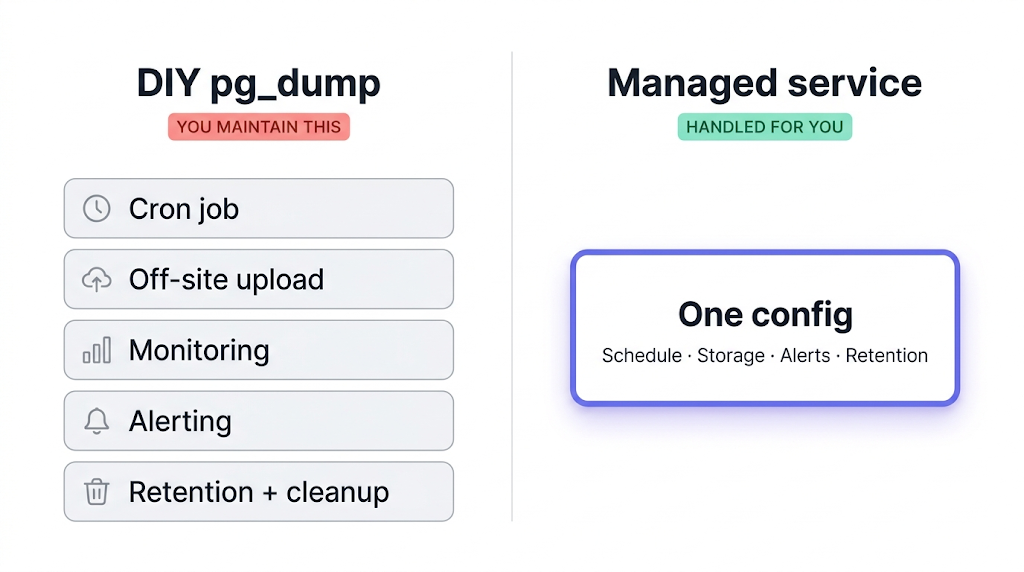
What DIY pg_dump actually involves
The base command is short:
pg_dump --host=aws-0-eu-central-1.pooler.supabase.com --port=6543 --username=postgres --format=custom --file=dump-$(date +%F).dump postgres
That's the start. A production-ready pg_dump pipeline for Supabase involves several more layers.
Off-site upload. A dump file sitting on the same server as your database doesn't protect you from the scenarios that matter: corrupted volume, runaway migration, accidental table drop. Off-site means a different region and ideally a different provider. You need to pipe the dump to S3, Cloudflare R2, Backblaze B2, or equivalent, handle credentials, compression, and upload error handling.
Scheduling. Cron works. Until the server is migrated, the crontab disappears, and nobody notices because nobody was watching.
Monitoring. This is the expensive part. If your shell pipeline swallows a non-zero exit code, a common pattern in pg_dump | gzip | aws s3 cp chains — your cron job reports success and your dump is empty. You find out when you need the restore.
We ran into this exact pattern: a script piping pg_dump through gzip into an S3 upload worked fine on small databases. On a larger project, one step in the chain swallowed a failed exit and the dump landed empty. We caught it only because a restore test failed three weeks later. That's what backup monitoring exists to catch.
Alerting. Monitoring tells you something went wrong. Alerting wakes someone up. Wiring monitoring output to Slack, email, or PagerDuty is straightforward in theory and fiddly in practice, especially when you need to handle flapping and escalation.
Retention management. Backups accumulate. A rotation policy and a cleanup script are both necessary, or storage costs grow without bound.
Restore testing. A backup you've never restored from is not a backup. A monthly restore test against a throwaway Supabase project is the only verification that matters. The Supabase documentation on backups covers the native restore path; for pg_dump restores, the process is different and project-specific.
For a complete step-by-step walkthrough of the pg_dump workflow for Supabase, including connection string format, pg_restore flags, and schedule recommendations, see how to back up Supabase Postgres.
What a managed backup service handles for you
A managed service replaces the infrastructure layer: scheduling, upload, monitoring, alerts, retention, and the storage account. You provide a connection string, pick a destination, set the schedule, and it runs. When a run fails, an alert fires. When a run succeeds, you get a log entry with duration and size.
The operational difference that matters most: managed services alert on failure by default. Not "the cron job ran," but "the backup completed and the dump is non-empty." That distinction is what the monitoring section above is about.
There's also a coverage difference. What Supabase's native backup doesn't cover goes into this in detail, but the short version is: your storage.objects metadata table is in the Postgres snapshot, but the actual file bytes in Supabase Storage are in a separate S3-compatible backend and are not covered. A managed service that supports Supabase Storage backs up both in one job.
Restore path is simpler too. Instead of running pg_restore with the right flags against a fresh Supabase project, a good managed service gives you a UI flow or a direct download. For teams who don't run restores frequently, that difference compounds.
For a fuller look at how the landscape breaks down, top 5 PostgreSQL backup tools covers the broader options for managed database backup beyond Supabase specifically. And for a direct feature comparison between native Supabase backup and SimpleBackups, Supabase native vs. SimpleBackups covers the full breakdown.
Feature comparison: DIY vs. managed
| Feature | DIY pg_dump | Managed service |
|---|---|---|
| Setup time | 4–12 hours | 15–30 minutes |
| Scheduling | Manual cron | UI + API |
| Failure alerts | Manual wiring | Built-in |
| Storage coverage | Postgres only | Postgres + Storage (with SimpleBackups) |
| Off-site storage | Your S3/R2 setup | Configured destination |
| Restore path | pg_restore + CLI | UI flow or file download |
| Backup verification | Manual restore test | Automated (depends on service) |
| Ongoing maintenance | Yes | Minimal |
| Cost | Infrastructure + developer time | Subscription |
| Compliance documentation | DIY | Usually provided |
One row worth unpacking: restore path. The CLI version works, but requires knowing the right pg_restore flags, the right target connection string, and what to do if the restore fails partway through. The managed path hands you a file or a one-click restore. Teams that run restores infrequently tend to forget the details between incidents.
The real cost of DIY (it's not just the server)
Infrastructure cost for a self-hosted pg_dump setup is low. A cron job on a cheap VPS, uploads to R2 or Backblaze, a few dozen gigabytes of retained dumps: under $10/month in hard costs for most Supabase projects.
The real question
It's not what the script costs to run. It's what happens when it silently fails at 3am and you find out at 9am when a rollback is the only path forward.
The actual cost is time:
| Cost category | Rough estimate | Notes |
|---|---|---|
| Initial setup | 4–12 hours | Script, upload, monitoring, restore test |
| Monitoring + alerting wiring | 2–6 hours | Depends on your existing stack |
| First incident response | 4–8 hours | Diagnosing a silent failure you've never seen |
| Monthly restore tests | 30–60 min/month | Essential but often skipped |
| Ongoing maintenance | 1–3 hours/month | Credential rotation, dependency updates, cron audits |
For most early-stage teams, the first two rows of that table represent more developer time than one month of a managed service subscription costs, before the script is even running reliably. The ultimate PostgreSQL backup script handles many of the scripting details, but the infrastructure around it still needs to be built and maintained.
When pg_dump scripts are the right call
pg_dump is the right tool when the backup is also the output: database exports for staging refreshes, pre-migration snapshots, or schema-only dumps for version control. Use it when control over the output format matters more than automation.
There are real scenarios where writing the script yourself is the better answer.
You're building something small or learning. A side project with no paying users doesn't need the operational overhead of a managed service. A cron job dumping to S3 every night costs nothing extra and gives you hands-on experience with the recovery path.
You already have the infrastructure. Teams with mature DevOps pipelines, existing monitoring stacks, and cloud accounts already in place aren't starting from zero. The integration cost drops significantly when the pieces exist.
You need specific backup formats or transformations. Schema-only exports, per-table dumps, PII-masked copies for staging: these require scripting. Managed services back up the whole database in one format. If your workflow depends on the shape of the output, DIY gives you control.
Your compliance requirements mandate direct chain-of-custody. Some certification frameworks require documented control over every step of the backup chain: key management, access control, retention proof. DIY lets you document the whole chain. Managed services vary; SimpleBackups is ISO 27001 certified and GDPR compliant, and provides the retention, encryption and restore documentation a SOC 2 auditor asks you to produce.
It's already working. If your scripts run reliably, are monitored, and your team knows how to operate them, there's no reason to change. Don't migrate a working system to solve a problem you don't have.
When a managed service is worth it
The managed service case is clearest when the team lacks the time or bandwidth to own the pipeline.
Production apps with real users. When a backup failure means lost data or a delayed rollback, "probably worked" is not a posture you can defend. The built-in monitoring and alerting are why you pay for the subscription.
Small teams without dedicated infrastructure ownership. A startup where the same person writes features and manages the servers is not going to audit backup logs on a Friday afternoon. The managed service runs whether or not anyone is thinking about it.
You need Storage covered. If your Supabase app uses Storage for file uploads, avatars, or documents, a Postgres-only backup leaves those files unprotected. Getting both covered in one job, with one alert channel, is simpler than running two separate pipelines.
You want verifiable restore evidence. Some regulated industries require you to demonstrate that backups restore successfully, with logs. A managed service that records restore results provides that evidence without additional tooling.
For a broader look at what's available in the market, best Supabase backup tools covers the landscape with specifics on each option.
What to do next
If you're on a Free plan with no production users: write the script (see how to backup Supabase for the exact command and connection string format), point it at R2 or Backblaze, and wire a dead-man's-switch alert so you know when it stops running. That's the minimum viable version.
If you're on a Pro plan or above with real users: the managed service pays for itself the first time it catches a failure you would have missed. Decide whether Postgres-only coverage is enough, or whether Storage needs to be in scope.
If you've read this far, you probably already know whether the DIY path is the right call. If it isn't, SimpleBackups handles Supabase Postgres and Storage backups off-site, with alerts when a run fails and a restore path that doesn't require memorizing flags.
Keep learning
- pg_dump and pg_restore guide with examples: foundational reference for flags, formats, and restore options
- How to restore a PostgreSQL backup: restore-focused companion covering common failure modes
- Supabase backup and recovery video tutorial: visual walkthrough of the backup and restore workflow
FAQ
Is pg_dump free for Supabase backups?
pg_dump itself is free. The costs are infrastructure (a server or object store for off-site dumps) and developer time for setup, monitoring, and maintenance. For small projects the hard costs can be near zero. For production systems, the time cost of the surrounding pipeline is where the comparison to managed services gets interesting.
How much developer time does a DIY pg_dump backup setup require?
Initial setup for a production-grade pipeline runs roughly 4 to 12 hours: writing the script, configuring off-site upload, setting up failure alerts, and completing a first restore test. Ongoing maintenance adds 1 to 3 hours per month for credential rotation, dependency updates, and cron audits.
Can a managed service back up Supabase Storage too?
Some do. SimpleBackups supports Supabase Storage alongside Postgres. Native Supabase backup doesn't include Storage file bytes, only the storage.objects metadata table. If your app uses Storage, confirm that any managed service you evaluate includes it explicitly before assuming coverage.
What happens when a pg_dump cron job fails silently?
Silent failures happen when a shell pipeline swallows a non-zero exit code, when the database connection drops mid-dump, or when the cron daemon isn't running. Without active monitoring, the job logs success and the dump is empty or truncated. A dead-man's-switch service like Healthchecks.io, which expects a ping after each successful run, is the minimum protection.
Is pg_dump fast enough for large Supabase databases?
For databases under 10 GB, a pg_dump run via Supabase's pooler typically finishes under 10 minutes. For databases over 50 GB, run time can reach 1 to 2 hours. On large sequential reads, test with the direct port (5432) rather than the pooler port (6543) since the pooler adds latency on long-running connections.
Can I use both pg_dump and a managed service at the same time?
Yes. A common pattern is using a managed service for nightly off-site backup plus a separate pg_dump run for staging refresh or schema export. The two jobs don't conflict.
This article is part of The complete guide to Supabase backup, an honest, practical reference from the team that backs up Supabase every day.