

Most Supabase backup tools cover your Postgres database. None of the free ones cover your Storage buckets. One covers both. Understanding that gap is the whole decision.
When teams search for Supabase backup tools, they're often picturing a database backup. But a Supabase project has three things worth protecting: the Postgres database, the Storage buckets holding user-uploaded files, and the Edge Functions that handle business logic. Supabase's native backup covers Postgres. Storage and Edge Functions are outside the snapshot boundary by design.
This article maps the current Supabase backup solutions landscape honestly. We run Supabase backups every day, and we've seen what teams discover after their first failed restore. The goal here is to help you match a tool to your actual coverage needs, team size, and budget, before you need the backup.
You'll leave with: a clear picture of what each tool covers, a comparison table you can skim in 90 seconds, and a decision framework for choosing between them.
What to look for in a Supabase backup tool
Before comparing tools, you need to know what you're comparing against. Not every team has the same exposure.
Coverage: which surfaces does the tool protect?
The most important dimension is what the tool actually backs up. Supabase has three separate data surfaces, and they require different approaches:
- Postgres: the relational database. Accessible via
pg_dumpor physical snapshot. All tools in this roundup cover it. - Storage buckets: the S3-compatible object store for user-uploaded files. Architecturally separate from Postgres. Most tools miss it. See our article on what Supabase native backup doesn't cover for the full breakdown.
- Edge Functions: source code, environment variables, and secrets. Some tools back up function code (SimpleBackups does). Secrets belong in a secrets manager, and function source belongs in Git as well.
A tool that only covers Postgres gives you a partial backup. If your app stores images, documents, or any user-uploaded content in Supabase Storage, you need a tool that explicitly covers that surface.
Retention and off-site storage
Where does the backup go, and for how long can you reach it? Supabase's native snapshots are managed inside the platform. If you need cross-region copies for compliance or disaster recovery, you need a tool that writes to an external destination.
If your compliance framework (SOC 2, GDPR, ISO 27001) requires data residency in a specific geography, check that your backup destination is in that region before anything else. Cross-region backup is a non-negotiable if your project and its snapshots live in the same AWS account.
Restore reliability
Backups that you haven't tested restoring are guesses, not backups. The practical question is: can you run a restore on demand, in a staging environment, without opening a support ticket? For most teams, this is where DIY solutions fall apart and managed services earn their fee.
Automation and alerting
A backup you have to remember to check manually will eventually be stale when you need it. Look for tools that alert on failure, not just on success.
Enterprise requirements
Larger teams should look beyond the feature list. SOC 2 Type II certification, audit logs, SLA commitments, and support response time matter at compliance-sensitive organizations. These aren't checkboxes for hobby projects, but they're the first thing a security review asks for.
Supabase native backup (the baseline)
Every tool comparison for Supabase starts here. Native backup is what you get on any paid plan, for free, with no configuration.
How it works
Supabase takes a physical snapshot of the Postgres volume daily on Pro plans. The snapshot is managed by Supabase inside the platform. You can restore from the Supabase dashboard, no external tools required. For the full mechanism, see our article on how Supabase native backup works.
| Plan | Price | Daily backups | Retention | PITR |
|---|---|---|---|---|
| Free | $0 | No | 0 days | No |
| Pro | $25/mo | Yes | 7 days | Paid add-on |
| Team | $599/mo | Yes | 14 days | Paid add-on |
| Enterprise | Custom | Yes | 30 days | Paid add-on |
What native backup covers:
- Postgres data (full physical snapshot)
storage.objectsmetadata table (file paths, sizes, created_at)
What native backup does NOT cover:
- Storage bucket file bytes (the actual images, PDFs, and other uploads)
- Edge Functions source code
- Environment variables and secrets
- Point-in-time recovery below the snapshot granularity (unless PITR add-on is enabled)
- Off-site or cross-region copies
When native backup is enough:
If your project is on the Pro plan and you have: no user-uploaded files outside the database, no compliance requirement for off-site storage, and a 7-day recovery window that works for your RTO/RPO. That covers a real slice of Supabase projects: internal tools, dashboards, low-sensitivity SaaS at early stage.
When native backup is not enough:
As soon as any of these is true: you store files in Storage buckets, you need copies outside AWS us-east-1 (or whatever region your project is in), you need restore testing without Supabase support involvement, or a compliance audit requires off-site backups with defined retention.
The Free plan gets no backups at all. If you're running a hobby project on Free and you care about the data, a monthly manual pg_dump to your local machine is better than nothing. It won't cover Storage, but it covers the database.
SimpleBackups
We built SimpleBackups. That means this section has a conflict of interest, and you should read it knowing that. We've tried to write it as we'd write a competitor review: honest about what it does, honest about what it doesn't, and clear about who it's for.
SimpleBackups is a managed backup service with native Supabase integration. You connect your project once (via connection string or Supabase API token), and it runs automated backups on a schedule you define, writes them to a storage destination you control (S3, GCS, DigitalOcean Spaces, Backblaze B2, and others), and alerts you when a run fails.
What SimpleBackups covers:
- Postgres (via
pg_dumpwith custom format, or physical backup) - Storage buckets (full file sync, not just metadata)
- Edge Functions (deployed function code; secrets stay in your secrets manager)
- Multiple retention schedules (daily, weekly, monthly)
- Off-site storage in any region you choose
- Restore testing from the dashboard
- Backup notifications and failure alerts
- ISO 27001 certified, GDPR compliant, with audit exports for your own SOC 2 evidence
What SimpleBackups does not cover:
- Real-time PITR at the Postgres WAL level (snapshots, not WAL streaming)
Pricing:
SimpleBackups charges per backup source. At the time of writing, the entry plan covers a handful of sources starting around $9/mo. Check /platform/supabase for current pricing, since it changes more often than this article.
For a deeper head-to-head between Supabase native and SimpleBackups on the dimensions that actually matter for a restore, see Supabase native vs. SimpleBackups.
Why trust this section
We run Supabase backups every day across thousands of customer projects. The pattern we see is consistent: teams discover the gap in native backup at the worst moment, usually when a restore doesn't cover Storage and they realize the images are gone. We built coverage for that gap. Whether SimpleBackups is right for your project is a separate question from whether that coverage matters.
DIY pg_dump + cron scripts
The most widely deployed Supabase backup "tool" isn't a tool at all. It's a shell script running pg_dump on a schedule, piping the output to an S3 bucket. This is what most teams reach for first, and it works reasonably well for the Postgres piece.
#!/bin/bash
# Basic Supabase Postgres backup script
# Run via cron: 0 3 * * * /opt/scripts/supabase-backup.sh

set -euo pipefail

DB_HOST="aws-0-eu-central-1.pooler.supabase.com"
DB_PORT="6543"
DB_USER="postgres"
DB_NAME="postgres"
TIMESTAMP=$(date +%Y%m%d_%H%M%S)
DUMP_FILE="/tmp/supabase_backup_${TIMESTAMP}.dump"
S3_BUCKET="s3://your-bucket/supabase-backups/"

pg_dump --host="${DB_HOST}" --port="${DB_PORT}" --username="${DB_USER}" --format=custom --no-password --file="${DUMP_FILE}" "${DB_NAME}"

aws s3 cp "${DUMP_FILE}" "${S3_BUCKET}"
rm "${DUMP_FILE}"

echo "Backup completed: ${DUMP_FILE}"
The --format=custom flag is important. It produces a compressed, non-text dump that pg_restore can work with selectively (individual tables, schemas, etc.). Plain text dumps are larger and harder to restore partially.
We almost shipped a version of this script at SimpleBackups that piped pg_dump directly to gzip and then into an S3 upload in a single pipeline. It works on small databases. On a 40 GB project it silently truncated because one of the middle commands swallowed a non-zero exit without failing the pipeline. We only caught it because a restore test failed three weeks later. The lesson: always write to disk first, verify the file size, then upload.
For the full walkthrough including connection pooler vs. direct connection, authentication, and restore steps, see how to back up your Supabase Postgres database.
What DIY pg_dump covers:
- Postgres schema and data
- Flexible: you control what gets dumped (full database, specific schemas, specific tables)
- Destination-agnostic: S3, GCS, local disk, any target your script can write to
What DIY pg_dump does NOT cover:
- Storage buckets (requires a separate sync script using the S3-compatible API)
- Edge Functions
- Alerting on failure (unless you build it)
- Restore testing automation
- Off-site storage (unless you explicitly configure it)
When DIY is the right call:
You have a database-only Supabase project. You have engineers comfortable with bash and cron. You want full control over what gets backed up and where it goes. You have existing infrastructure for storage (your own S3 bucket) and monitoring.
When DIY breaks down:
When you have Storage. When the engineers who wrote the scripts leave. When nobody tests the restore. When the cron job silently stops running and you don't find out for three weeks. For a deeper comparison between scripting it yourself and using a managed service, see pg_dump vs. managed Supabase backup.
If you're going the DIY route, the single most valuable thing you can add is a restore test. Once a month, take your latest dump, spin up a local Postgres instance or a Supabase project in a free tier, and run pg_restore. Don't assume the dump is valid because the script exited 0. Test the output.
Other managed backup services
The market for dedicated Supabase backup services is small. Supabase is newer than most of the Postgres ecosystem, and most enterprise backup tools are built for databases they can reach via agent or physical access, neither of which works with Supabase's hosted architecture.
Here's an honest survey of the adjacent tools you might encounter:
WAL-G and pgBackRest
Both are open-source Postgres backup tools with strong WAL archiving capabilities. They're the right tools for self-hosted Postgres.
For Supabase cloud projects, they're not viable without physical access to the Postgres volume. You can't install agents on Supabase's managed infrastructure. If you're running self-hosted Supabase on your own servers, both WAL-G and pgBackRest become real options. For cloud Supabase, they're out of scope.
General SaaS backup services
Services like CloudCasa, Zerto, and similar enterprise backup platforms cover cloud-native workloads, but their Postgres support typically requires direct infrastructure access or agent installation. None of them have published native Supabase integration at the time of writing. They're enterprise-grade for AWS RDS, Aurora, and GCP CloudSQL, not Supabase.
Snaplet
Snaplet is a developer tool for cloning and seeding databases in development environments. It's not a backup tool. It transforms and sanitizes data for non-production use. If you're looking for production backups, Snaplet isn't the answer, but it's worth knowing what it is so you don't confuse it with one.
The honest summary
WAL-G and pgBackRest are excellent tools for self-hosted Postgres. For cloud Supabase, they require physical volume access that Supabase doesn't provide. If you find an article recommending them for Supabase Cloud, it's written for a different audience.
For cloud Supabase, the managed backup market has two real options: Supabase's own native backup, and SimpleBackups. Everything else is either a DIY Postgres tool (WAL-G, pgBackRest, pg_dump), a general SaaS platform that requires infrastructure access Supabase doesn't give you, or a tool built for a different job. That's not a product pitch; it's a map of what actually exists today.
Head-to-head comparison table
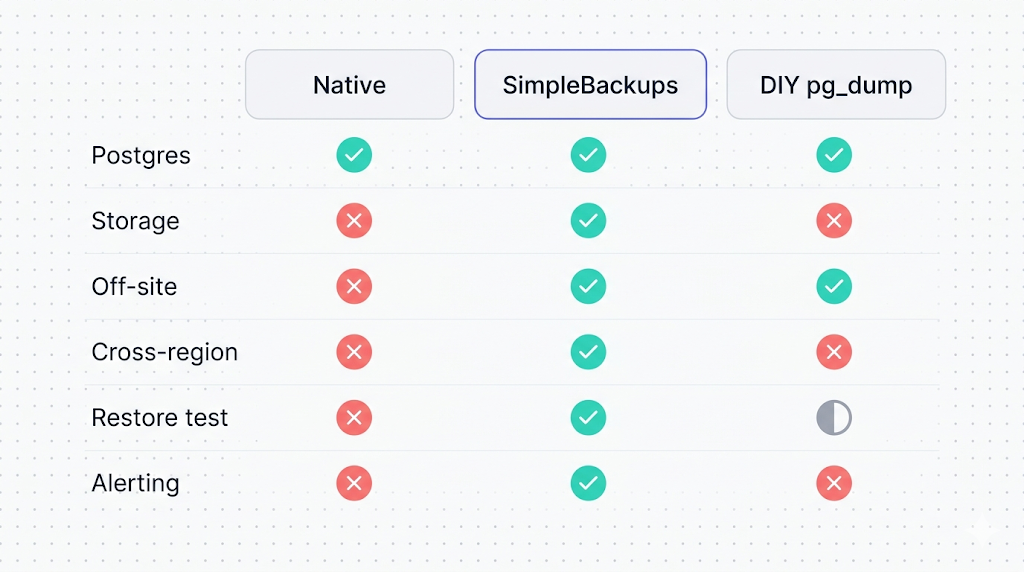
| Dimension | Supabase native | SimpleBackups | DIY pg_dump |
|---|---|---|---|
| Postgres backup | Yes (physical snapshot) | Yes (logical dump) | Yes (logical dump) |
| Storage bucket files | No | Yes | No (manual sync needed) |
| Edge Functions | No | Yes (function code) | No |
| Off-site storage | No (Supabase-managed) | Yes (your choice of cloud) | Yes (your choice) |
| Cross-region | Not documented | Yes | Yes (if configured) |
| Retention control | Fixed by plan (7/14/30 days) | Configurable | Configurable |
| Restore from dashboard | Yes | Yes | No (manual pg_restore) |
| Failure alerting | Not documented | Yes | Only if you build it |
| PITR | Paid add-on | No | No (WAL-G on self-hosted only) |
| Restore testing | Not documented | Yes | Manual |
| SOC 2 / compliance | Supabase's certifications | ISO 27001, GDPR, audit exports | Depends on your infra |
| Cost | Included with paid plans | Paid (separate) | Engineering time + storage costs |
| Setup time | None | Minutes | Hours to days |
Pricing comparison
| Option | Entry cost | What you get |
|---|---|---|
| Supabase native | $0 (included with Pro at $25/mo) | 7-day Postgres snapshots, Supabase-managed |
| SimpleBackups | $0 for 1 backup, then $10/b | Postgres, Storage, Edge Functions, off-site, alerts |
| DIY pg_dump | $0 tool cost + your S3 costs | Postgres only, full control |
Which tool fits which team
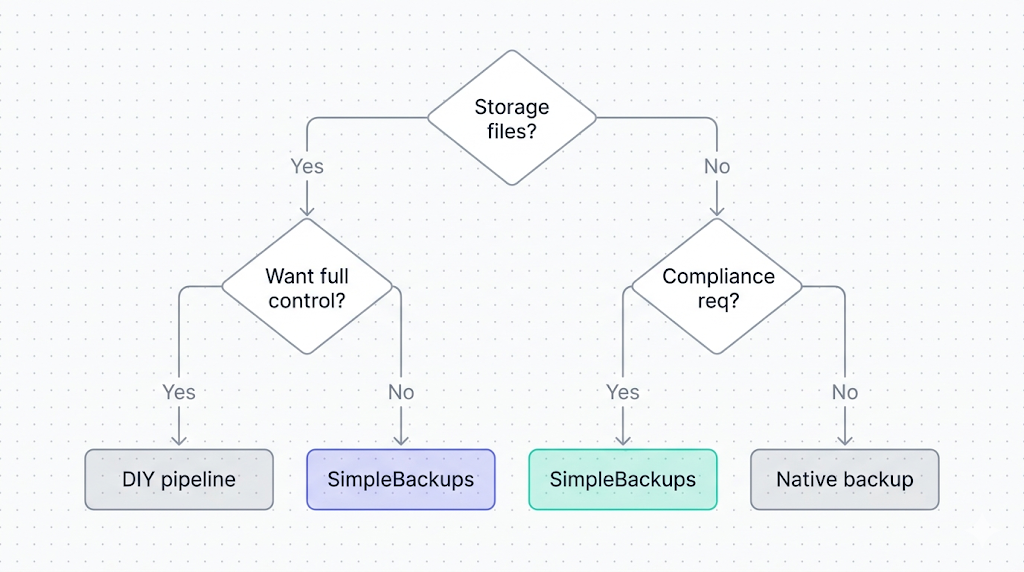
This isn't a one-size-fits-all category. The right answer depends on four variables: what you're backing up, where it needs to go, how much restore confidence you need, and what you're willing to maintain.
Hobby projects and early-stage prototypes
Recommendation: Supabase native + one manual pg_dump per month.
If you're on the Pro plan, native backup covers your database. If you have Storage files, accept that risk or set up a simple sync script. Don't over-engineer backup for a project that hasn't found product-market fit yet. Your time is better spent elsewhere.
For hobby projects on the Free tier: Supabase gives you no backups at all. A cron job running pg_dump weekly to your own S3 bucket costs almost nothing and saves you from a data loss event that would otherwise wipe months of work.
Teams with user-uploaded content
Recommendation: SimpleBackups (or a custom sync script if you have the bandwidth).
As soon as you have files in Storage that users depend on, native backup's Storage gap matters. A database restore that doesn't bring back the images, PDFs, or attachments attached to those records is a partial restore at best, and a data loss event at worst. If you don't want to maintain a second backup pipeline yourself, SimpleBackups covers both surfaces in one setup.
Regulated or compliance-sensitive organizations
Recommendation: SimpleBackups with cross-region configuration, or a DIY setup you control entirely.
SOC 2 Type II audits ask two questions about backups: are they tested, and are they off-site? Native backup fails both tests. A compliance audit that asks "show me your backup policy" needs answers about where backups go, who can access them, how restores are tested, and what the retention policy is. That's not a native backup conversation.
Engineering teams who want control
Recommendation: DIY pg_dump pipeline if Postgres-only. DIY + Storage sync if you have both.
If your engineering team is comfortable with bash, cron, and S3, and you have existing infrastructure for monitoring and alerting, rolling your own is completely reasonable. The tradeoffs are real (you own the maintenance, the restore testing, the failure handling) but so are the benefits (full control, no vendor dependency, lower marginal cost at scale).
Scaling SaaS products
Recommendation: SimpleBackups for the ops simplicity, or a hybrid where DIY handles Postgres and SimpleBackups handles Storage.
At scale, the cost of a failed backup incident exceeds the cost of the backup service by orders of magnitude. Most fast-growing SaaS teams reach a point where they want backup handled by something with an SLA, a support team, and compliance certifications, so they can focus engineering on the product.
Our honest recommendation
If you're on Supabase Pro and your app has zero user-uploaded Storage files: native backup is probably enough for now. Validate that once, make sure your RTO (how long you can be down) and RPO (how much data you can afford to lose) fit within a 24-hour window, and revisit when either changes.
If your app stores files in Storage: native backup is not enough. Choose between setting up your own sync pipeline or using SimpleBackups. The honest version of that choice is: DIY costs engineering time and ongoing maintenance, SimpleBackups costs a monthly fee and takes about ten minutes to set up. Pick based on which cost you prefer.
If compliance matters: go off-site and test your restores. Neither native backup nor an untested DIY script satisfies an audit. A tested, off-site, alerting-enabled backup does.
The question nobody asks
Most teams spend more time choosing a backup tool than they spend testing a restore. The tool choice is reversible. An untested backup that fails when you need it is not. Whatever you choose, schedule a restore test on the calendar for 30 days from today.
What to do next
Pick one concrete step from this list and do it today:
- Check what plan you're on. If you're on Free, set up a pg_dump cron job this week. No plan means no backup.
- Audit your Storage usage. Run
SELECT COUNT(*) FROM storage.objects;in the Supabase SQL editor. If the count is non-zero and you don't have a Storage backup, that's your gap. - Test your existing restore. If you already have native backup or a DIY script running, restore from the most recent snapshot to a fresh Supabase project. Confirm the data is complete and current.
- If you need off-site or Storage coverage: check the
/platform/supabasepage for current pricing and supported destinations.
SimpleBackups for Supabase complements Supabase's native backups. If you want off-site Postgres, Storage, and Edge Functions backups without writing or maintaining any of it yourself, that's what it does.
Keep learning
- How Supabase's native backup actually works, the physical snapshot internals, retention windows, and restore limitations. Read this first if anything in this article felt assumed.
- What Supabase's native backup doesn't cover, the six gaps this roundup addresses: Storage, Edge Functions, off-site storage, long retention, portability, and compliance.
- How to back up your Supabase Postgres database, the practical pg_dump setup for teams going the DIY route.
- Top 5 PostgreSQL backup tools, for readers who want the broader Postgres ecosystem landscape beyond Supabase-specific options.
FAQ
What's the best free Supabase backup tool?
For Postgres, pg_dump scripted via cron is the best free option. It's free, gives you full control over where the backup goes, and works on any Supabase plan. Supabase's native backup is included with Pro but doesn't cover Storage. There's no free tool that covers both Postgres and Storage automatically.
Does Supabase have built-in backup?
Yes. Supabase includes daily Postgres snapshots on paid plans (Pro and above). The Free plan has no automated backup. Retention is 7 days (Pro), 14 days (Team), or 30 days (Enterprise). Native backup does not cover Storage buckets, Edge Functions, or cross-region copies.
Can I back up Supabase Storage with any of these tools?
Yes, but only SimpleBackups does it automatically. Supabase native backup excludes Storage file bytes. A DIY setup can cover Storage with a separate sync script, but that requires building and maintaining a second pipeline. SimpleBackups covers both Postgres and Storage in one configured source.
How much do Supabase backup tools cost?
Supabase native backup is included with the Pro plan at $25/month. SimpleBackups starts around $9/month for entry-tier sources (check current pricing). DIY pg_dump has no software cost but you pay for your own storage and engineering time.
Which backup tool supports cross-region replication?
SimpleBackups and a DIY pg_dump pipeline configured to write to external storage both support cross-region backup, because you choose the destination. Native backups are managed inside Supabase's platform, so cross-region copies are something you add yourself.
Do I need a backup tool if I'm on Supabase's Pro plan?
It depends. If you have no Storage usage, no compliance requirements, and a 7-day recovery window fits your needs, native backup may be enough. If you store files in Storage buckets, need cross-region copies, need testable restores, or face compliance requirements, native backup alone is not sufficient.
Can I use multiple backup tools together?
Yes. A common setup is native backup for fast Postgres dashboard restores plus SimpleBackups or a DIY script for Storage coverage and off-site retention. Running both creates redundancy, but verify what each tool actually covers so you don't assume they fill each other's gaps.
This article is part of The complete guide to Supabase backup, an honest, practical reference from the team that backs up Supabase every day.