

Supabase's dashboard shows backups for your Postgres database. Here's what that covers and what teams often add on top. One example: after a Storage bucket gets wiped, a database restore brings back the file records but not the files themselves.
The native daily backup snapshot covers your Postgres database. It doesn't cover Storage bucket contents, Edge Functions source code, or secrets. It is managed inside Supabase's platform, so an independent off-platform copy is something you add yourself.
This article puts both options side by side: what Supabase's native backup actually covers, what SimpleBackups adds on top, and the honest answer to when native backup is genuinely enough for your situation. We'll work through the supabase native backup vs simplebackups comparison the way you'd make the decision yourself: surface by surface, scenario by scenario.
Why trust this article
We run Supabase backups every day. The pattern we see is consistent: teams discover the gaps in native backup when they need data back, not before. The comparison here comes from real restore workflows, not from reading marketing pages.
What you get with Supabase's native backup
Supabase's native backup is a physical snapshot of your Postgres volume. This distinction matters more than it sounds.
A physical snapshot copies the raw storage blocks of the database volume at a point in time. It's faster to take than a logical dump, faster to restore, and doesn't require a running Postgres connection. The tradeoff: it captures exactly what's on that volume. Anything stored elsewhere, including Storage bucket files and Edge Functions code, is simply not part of it.
Supabase's backup documentation describes the snapshot mechanism and the retention windows by plan. The retention table is worth keeping in mind, because it defines the outer boundary of what native backup can do for you:
| Plan | Price | Daily backups | Retention | PITR |
|---|---|---|---|---|
| Free | $0 | No | 0 days | No |
| Pro | $25/mo | Yes | 7 days | Paid add-on |
| Team | $599/mo | Yes | 14 days | Paid add-on |
| Enterprise | Custom | Yes | 30 days | Paid add-on |
A few things that frequently surprise teams:
Free projects don't include automated backups. Supabase recommends that Free projects export their data regularly and keep off-site copies. If a table gets corrupted or dropped on a Free project, there is no scheduled backup to restore from. It's documented, but easy to miss when you're moving fast.
Retention is fixed by plan, not configurable. You can't pay to extend a Pro project's retention from 7 days to 30. You'd need to upgrade to Enterprise for that. If your compliance policy requires more than 30 days, native backup can't meet it at any plan tier.
Daily snapshots are checkpoints, not continuous. Native backup takes one snapshot per day. If you drop a table at 11:45 PM and the snapshot ran at midnight, your most recent usable backup is from yesterday. The gap between the snapshot time and the incident is unrecoverable unless you're running PITR.
PITR is separate and costs extra on most plans. Point-in-Time Recovery lets you restore to any timestamp within the retention window, not just the daily checkpoint. On Pro, Team and Enterprise it's a paid add-on. If PITR is what you need, the cost calculus changes. For a clear breakdown of when PITR is actually worth adding, see when Supabase PITR is needed.
Restores target Supabase projects. On paid plans you can restore a backup into the same project or into a new project. The new-project restore is database-only: Storage objects and Edge Functions aren't copied, and the new project is billed as its own project. A portable file for a local or non-Supabase Postgres comes from a logical dump.
For a deeper look at how the snapshot mechanism works, the WAL archiving that enables PITR, and what happens during a restore, see how Supabase's native backup works.
What native backup doesn't cover
This is where the coverage gaps become material for production projects. The misses aren't edge cases: they're the surfaces that most production applications actually rely on.
Storage file bytes are not included. Supabase Storage runs on an S3-compatible backend separate from the Postgres volume. The storage.objects table in Postgres tracks filenames, bucket paths, sizes, and metadata. That metadata is in the Postgres snapshot. But the actual file bytes sitting in S3 are not.
The practical consequence: if you restore your Postgres database from a native backup, every row in storage.objects comes back. The image URLs are valid. The file paths exist. But if the underlying S3 objects were deleted, overwritten, or corrupted after your backup point, those paths now point to nothing. You have broken links, not a restored application.
Edge Functions source code and secrets are not included. Edge Functions run on Supabase's Edge Runtime, outside your Postgres volume. Neither the function source code nor the environment variable secrets are stored there. If you delete a function, redeploy the wrong version, or lose access to the code, native backup can't recover it. For the specifics of how to back up Edge Functions properly, see how to back up Supabase Edge Functions.
Native backups are managed inside Supabase's platform. Supabase stores and manages them for you, which is the right default for fast recovery. It also means an independent copy, in a storage account and region you choose, is something you add yourself.
This matters for three reasons. First, a copy outside the platform survives an incident that affects the project and its managed backups together. Second, GDPR and similar data residency rules sometimes require that backups sit in a specific jurisdiction you can name and document. Third, SOC 2 Type II and ISO 27001 controls typically ask for evidence of off-site backup storage, which is easier to show with a copy in storage you control.
Test your restores. Taking a snapshot is not the same as proving it restores. Whichever backup you use, run a test restore on a schedule so you know the data is complete before you need it.
For the full gap analysis with concrete examples, including the Storage metadata trap and the compliance implications, see what Supabase native backup doesn't cover.
The storage.objects metadata gap is the most commonly misunderstood behavior. Teams assume a database restore puts everything back because the file metadata is in Postgres. It restores the rows in storage.objects, including filenames and paths. But if the S3 file bytes were deleted or overwritten, the filenames point to nothing. You get 200 OK responses on image URLs that return empty content.
What SimpleBackups adds
SimpleBackups is a backup automation service that runs on top of your Supabase project. It connects to your Supabase instance and covers the surfaces that native backup leaves unprotected.
Postgres backup via pg_dump. SimpleBackups exports your Postgres database using pg_dump, producing a logical dump rather than a physical snapshot. The key difference: a logical dump is a portable file. You can download it, inspect it, verify it, and restore it to any Postgres instance anywhere, including a different Supabase project, a local database, or a staging environment. The dump gets stored in the cloud storage destination you configure.
Storage bucket backup. SimpleBackups uses Supabase Storage's S3-compatible API to copy the actual file bytes from your buckets to your backup destination. This closes the most material gap native backup leaves open: your user-uploaded content, images, documents, and any other bucket files get captured as real data, not just as metadata rows.
Edge Functions backup. SimpleBackups backs up your deployed Edge Function bundles via the Supabase Management API. The bundles are captured on your configured schedule and stored off-site. Environment secrets are not included in the function backup (they require separate handling).
Off-site, cross-region storage. Your backup files go to the destination you configure: an S3 bucket in a different region, Google Cloud Storage, Backblaze B2, DigitalOcean Spaces, Wasabi, or others. That destination can be in a completely different cloud provider and region from your Supabase project. This makes cross-region redundancy a configuration choice rather than a plan upgrade.
Backup verification. SimpleBackups tests each backup for completeness after it runs. You receive an alert when a backup fails. If the backup job produces an incomplete file or errors out, you know the same day. Not when you try to restore months later.
Flexible scheduling and retention. You configure how often backups run and how long files are kept. Daily at 3 AM UTC, every 6 hours, twice a week: your call. Retention can be set independently for each backup type, which means you might keep 90 days of daily Postgres dumps while keeping only 30 days of Storage backups, based on your actual storage cost and recovery requirements.
Downloadable, restorable backup files. Because SimpleBackups stores standard pg_dump files and raw file copies, you can download any backup and restore it yourself without going through Supabase's interface. This is essential for restore testing, disaster recovery drills, and migrations.
Why we built this
SimpleBackups for Supabase complements Supabase's native backups. If you want independent off-site copies of Postgres, Storage, and Edge Functions in storage you own, without writing and maintaining the scripts yourself, that's what it does.
Side-by-side comparison
This table covers everything that matters when choosing between the two options:
| Feature | Supabase native | SimpleBackups |
|---|---|---|
| Postgres backup | Yes (physical snapshot) | Yes (pg_dump logical dump) |
| Storage file backup | No | Yes |
| Edge Functions backup | No | Yes (source code) |
| Backup destination | Managed by Supabase | Your cloud storage, any region |
| Independent off-platform copy | No | Yes |
| Retention control | Plan-fixed (0–30 days) | You configure |
| PITR | Paid add-on | Via backup frequency |
| Backup verification | Not documented | Yes |
| Downloadable backup file | No | Yes |
| Restore to a new Supabase project | Yes, paid plans (database only) | Yes |
| Cost | Included in plan | Paid separately |
| Setup required | None | ~15 minutes |
| Compliance-friendly off-site | No | Yes |
A few cells in that table worth expanding:
Physical snapshot vs. logical dump. Supabase's native restore is fast and complete: it replaces your database volume in place. A pg_dump logical dump is portable: it can be restored to any Postgres instance, any version, anywhere. The native path is simpler when you're restoring to the same project. The pg_dump path is more flexible for everything else. Both have their place; the question is which scenarios you need to be prepared for. For a more detailed look at the tradeoffs, see pg_dump vs. managed Supabase backup.
Retention control. With native backup, you get whatever your plan provides. Pro is 7 days and that's not negotiable. With SimpleBackups, you configure the retention window yourself. You could keep 90 days of daily Postgres dumps and 30 days of hourly Storage backups, or any combination that matches your compliance and cost requirements.
Restore to a new project. Native restore can put data back into the same project, or into a new project on paid plans. The new project is billed separately and gets the database only, so Storage files and Edge Functions need separate handling. A pg_dump can be restored to any Postgres instance you already run, which makes validating a restore on staging straightforward.

When native backup is genuinely enough
Native backup is not a bad option for the right project. If all four of these apply, native coverage is probably sufficient:
Your data is only Postgres. No Storage buckets with user-uploaded files. No Edge Functions. The entire state of your application lives in the Postgres database, and nothing else. If a restore brings Postgres back, everything is back.
You're on Pro or higher. Free projects don't include automated backups, so a bug, a bad migration, or a dropped table has no scheduled backup to restore from. Pro gives you 7 days of daily checkpoints. For a side project or an internal tool where you could reconstruct recent data from logs or from the source application, that's a reasonable baseline.
You don't have compliance requirements. No GDPR data residency rules, no SOC 2 Type II audit trail, no ISO 27001 off-site storage requirement, no contractual or regulatory backup retention mandate. If your application doesn't operate under any framework that specifies what backup must look like, native backup's defaults are at least something.
The data loss window is acceptable. You've looked at the gap between your last daily snapshot and a potential incident, and you've decided that losing up to 24 hours of data is tolerable for this project. Not every project has zero tolerance for data loss. Side projects and internal tools often don't.
Free projects don't include automated backups. Run a pg_dump on a schedule or set up SimpleBackups. Even a daily pg_dump shipped to an S3 bucket is a real safety net.
When you need something more
The threshold for needing more than native coverage is lower than most teams expect going into production.
You have Storage buckets with files that matter. If users upload profile photos, documents, videos, or any content that lives in Supabase Storage, native backup doesn't protect those files. One accidental bucket deletion, a runaway migration script, or a permissions misconfiguration that lets users delete each other's files leaves you with a gap native backup can't fill. Your database comes back from a restore; your users' uploaded content does not.
You need a reliable restore to a staging environment. The right way to validate a database restore is to run it in a staging environment before you touch production. If you've never tested a restore, you don't actually know whether your backup works: you have a file that runs nightly and a hope that it's valid. Native restore to a new project works on paid plans, but it creates a separately billed project and copies the database only. A pg_dump backup restores into any Postgres instance you already run.
You have compliance or regulatory requirements. GDPR requires you to process and delete specific users' data on request while retaining everything else, and you need to be able to demonstrate you can do it. SOC 2 Type II requires documented backup procedures, retention policies, and evidence that you tested the restore process. ISO 27001 requires off-site backup storage. Native backup doesn't provide the control, documentation, or off-site copy these frameworks require.
You need retention longer than 30 days. Enterprise provides 30 days of native retention. If your legal, contractual, or compliance policy specifies 90 days, one year, or longer, you need backup files stored in a location where you control the retention independently.
You run Edge Functions with logic or secrets that took significant effort to develop. Function source code that isn't in version control is gone when a deployment goes wrong. Native backup never touched it. If your function source lives only in Supabase's managed environment, you have no recovery path from a bad deploy beyond rewriting from memory.
You want to hear about a failed backup the same day. Whatever you use, alerting on failed runs means you find out before you need the restore.
Cost comparison: native vs. SimpleBackups vs. DIY
Native backup: included in your Supabase plan. No separate line item. You pay $25/mo for Pro, $599/mo for Team, or a custom Enterprise price, and backup is part of that package. The cost of what's missing (Storage, an off-platform copy, alerting, verification) isn't on your invoice; it shows up in the recovery scenarios native can't handle.
SimpleBackups: a paid subscription on top of your Supabase plan. What you get for that cost is the complete coverage picture: off-site Postgres dumps, Storage file backup, Edge Functions backup, backup verification, alerting, and flexible scheduling and retention. The setup time is roughly 15 minutes; ongoing maintenance is minimal.
DIY: you can replicate most of SimpleBackups' feature set with scripts and automation. The components are all available:
- A scheduled
pg_dumppiped to an S3 bucket (see how to back up Supabase Postgres for a working script with scheduling) - A Storage export script using the Supabase S3-compatible API
- A cron job running on a server or a CI/CD pipeline you manage
- An alerting webhook that fires on job failure
- A quarterly restore drill you run against a staging database
This works. We've seen it work well when someone owns it explicitly and maintains it over time. The hidden cost isn't cloud storage (a few dollars a month) or server compute (minimal). It's the developer hours to build the system initially, the ongoing maintenance when edge cases surface, the mental overhead of owning one more piece of infrastructure, and the restore drills you need to run to confirm the backup is actually valid.
The pattern we see most often in support: teams build a solid DIY backup solution during initial infrastructure setup, it runs without issues for several months, the original developer moves to a different team or leaves, the system accrues small breakage (a script that stopped running when the server was migrated, an alert that was never re-wired after a Slack channel rename), and the team only discovers the state of things during an incident.
| Option | Direct cost | Developer time | Off-site | Alerts | Verified |
|---|---|---|---|---|---|
| Native only | Included in plan | None | No | Not documented | Not documented |
| SimpleBackups | Monthly subscription | ~15 min setup | Yes | Yes | Yes |
| DIY (maintained) | Cloud storage (~$1–5/mo) | 4–8 hrs/yr ongoing | Yes | Depends | Depends |
| DIY (drifted) | Cloud storage | High to rebuild | Yes | Probably not | Unlikely |
The "drifted DIY" row isn't unfair to include. It's the most common outcome when backup tooling isn't someone's explicit ongoing responsibility.
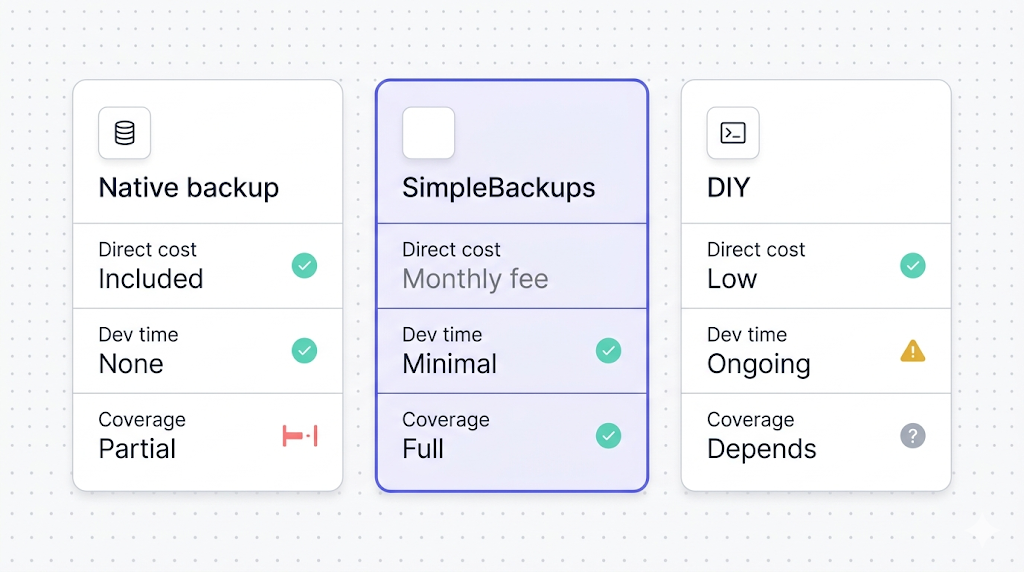
The hidden cost of DIY that most cost comparisons miss: the quarterly restore test. Running a real restore against a staging environment, verifying the data is complete, and documenting the result takes a couple of hours every quarter. If you're not doing it, your backup is hypothetically valid but practically unproven. Factor that time into the cost comparison.
When native is enough (and when it isn't)
The question isn't "is native backup good?" It's "does native backup cover the scenarios my project needs to be protected against?"
For a hobby project, a personal side project, or an internal tool with no compliance requirements and no user-uploaded content, native backup on a paid plan is a reasonable baseline. The data is Postgres. The retention window matches the realistic recovery scenario. The risk of losing 24 hours of data is acceptable given the project's stakes.
For a production application where users store content in Storage, the answer shifts immediately. You have data that native backup never touches, running the risk of a restore that looks complete but isn't. This isn't a failure of Supabase's backup system; it's a fundamental architectural boundary between Postgres and Storage. No amount of plan upgrading closes it.
For applications under compliance frameworks, the same boundary applies: native backup is managed inside Supabase's platform and doesn't give you configurable retention beyond what the plan provides. These aren't gaps a more expensive plan closes; they're the gaps off-site backup automation is specifically built for.
The how-supabase-native-backup-works article recommends testing your restore path before you need it in production. That recommendation is worth taking seriously regardless of which option you're using. The difference is that testing a native restore requires working within Supabase's restore interface; testing a pg_dump restore means running pg_restore against a staging instance with the actual file you'd use in a real incident.
A simple heuristic: if the honest answer to "what happens if I lose everything in Supabase right now" is "I restore the Postgres backup and nothing else is lost," native backup is probably sufficient. If Storage files matter, if Edge Functions represent meaningful work, or if you want to test restores against a Postgres instance you already run, you need something more.
What to do next
The decision path is shorter than this article may have made it seem.
Free tier, side project, Postgres only: set up a scheduled pg_dump and ship the file to an S3 bucket or equivalent. Even weekly is better than zero. Native automated backups don't apply to you.
Paid tier, Postgres only, no compliance, acceptable data loss window: native backup probably covers you. Confirm the retention window is enough for your realistic recovery scenario, and consider running a single restore test in a staging environment just to confirm the process works.
Paid tier, Storage buckets in use: you need off-site Storage backup. Native backup doesn't cover it. Set up SimpleBackups or a Storage export script you'll maintain over time. The Storage gap is the single biggest real-world blind spot in native backup.
Paid tier with compliance requirements: you need off-site backup with configurable retention and evidence of testing. That's not something native backup can provide at any plan tier.
Production application with user data: run a restore test. Not in theory. Actually restore from your backup into a staging environment, verify the data is complete, and document that it worked. If your current setup doesn't make that test easy to run, that's the problem to fix first. For a broader comparison of all your tool options, see the best Supabase backup tools.
Keep learning
- How Supabase's native backup works: the mechanics behind the physical snapshot, retention windows, and PITR
- What Supabase native backup doesn't cover: the full gap analysis with real failure scenarios
- How to back up Supabase Storage: the S3-compatible export workflow
- How to back up Supabase Postgres: a working pg_dump script with scheduling
- The best Supabase backup tools: broader comparison if you want more than two options
FAQ
Is Supabase's native backup enough for production?
It depends on what your production application stores and what your recovery requirements are. Native backup covers Postgres data with 7 to 30 days of retention depending on plan, but it does not cover Storage files, Edge Functions, or off-site copies. For apps with user-uploaded content, compliance requirements, or cross-region needs, native backup alone leaves material gaps.
How much does SimpleBackups cost for Supabase?
SimpleBackups has a paid subscription for managed backup automation. Current pricing is on the SimpleBackups for Supabase page at simplebackups.com/platform/supabase.
Can I use SimpleBackups with the Supabase free tier?
Yes. SimpleBackups connects to any Supabase project regardless of plan. For Free projects it is especially valuable because Free projects don't include automated backups, so SimpleBackups provides the scheduled backup.
Does SimpleBackups replace Supabase's native backup or complement it?
It complements it. Native backup continues to run on paid plans; SimpleBackups adds off-site Postgres dumps, Storage file backup, Edge Functions backup, verification, and alerting on top of what native provides.
What storage providers does SimpleBackups support for Supabase backups?
SimpleBackups supports Amazon S3, Google Cloud Storage, Backblaze B2, DigitalOcean Spaces, Wasabi, and other major cloud storage providers as backup destinations.
How does SimpleBackups handle Supabase Storage backups?
SimpleBackups uses Supabase Storage's S3-compatible API to copy the actual file bytes from your buckets to your backup destination. Native backup only captures file metadata in the storage.objects table, not the file bytes themselves. SimpleBackups captures both.
Is there a free trial for SimpleBackups?
Check the SimpleBackups for Supabase page at simplebackups.com/platform/supabase for current trial availability.
This article is part of The complete guide to Supabase backup, an honest, practical reference from the team that backs up Supabase every day.