

Pro plans get 7 days of retention. Team gets 14. Enterprise gets 30. Free gets nothing.
Those are the numbers Supabase publishes. The numbers nobody publishes are the ones that matter more: what percentage of your actual project each plan covers. If your project uses Storage, Edge Functions, or anything beyond the Postgres database, the honest answer is somewhere around half.
This article is the long version of that answer, with what's covered, what isn't, and what to do about each gap.
Why trust this article
We run Supabase backups every day for thousands of projects. The pattern we see is consistent: teams discover the gaps in native backup the hard way, usually at the moment they needed the data back. The goal here is to move that discovery up, to now, on a Tuesday afternoon when it costs nothing.
After reading this, you'll know exactly what Supabase's daily backup protects, what it silently doesn't, and which of the gaps matter enough to close for your project.
How Supabase's native backup actually works
Before the gaps, the thing itself. For the full walkthrough of how the native snapshot, retention, and PITR actually work, see How Supabase's native backup actually works. The short version lives below.
The thing: a physical snapshot
When Supabase says "daily backup" it means a physical snapshot of the Postgres volume your project runs on. Not a pg_dump. Not a logical export.
A volume-level snapshot of the underlying disk, taken by the cloud provider (AWS under the hood), rotated on a retention schedule that depends on your plan.
That distinction matters, and it's the root of several gaps further down.
A physical snapshot is fast to take and fast to restore, but it's also not portable. You can't download it. You can't restore it on another Postgres server you run. Everything about "where does my backup live" and "can I take it with me" flows from that single architectural choice.
Plans and retention
Here's the plan landscape in one table. This is the part Supabase publishes clearly:
| Plan | Price | Daily backups | Retention | PITR |
|---|---|---|---|---|
| Free | $0 | No | 0 days | No |
| Pro | $25/mo | Yes | 7 days | Paid add-on (usage-based, around $140/mo for 7-day PITR on a typical project) |
| Team | $599/mo | Yes | 14 days | Paid add-on (same usage-based pricing model) |
| Enterprise | Custom | Yes | 30 days | Paid add-on |
Point-in-Time Recovery (PITR) is a separate product. On paid plans you can pay extra to recover to any second inside a recovery window. PITR stores Write-Ahead Logs (WAL) continuously and replays them. We'll come back to PITR's own gaps in the section on retention.
A few other operational facts that matter later:
- Backups are managed by Supabase inside the platform.
- You trigger a restore from the Supabase dashboard's Database Backups tab. If you need a step-by-step walkthrough of all three restore paths (Dashboard snapshot,
pg_restore, and CLI), see How to restore a Supabase database from backup. - Native backups are included in the plan price. You don't pay per backup or per GB of retention.
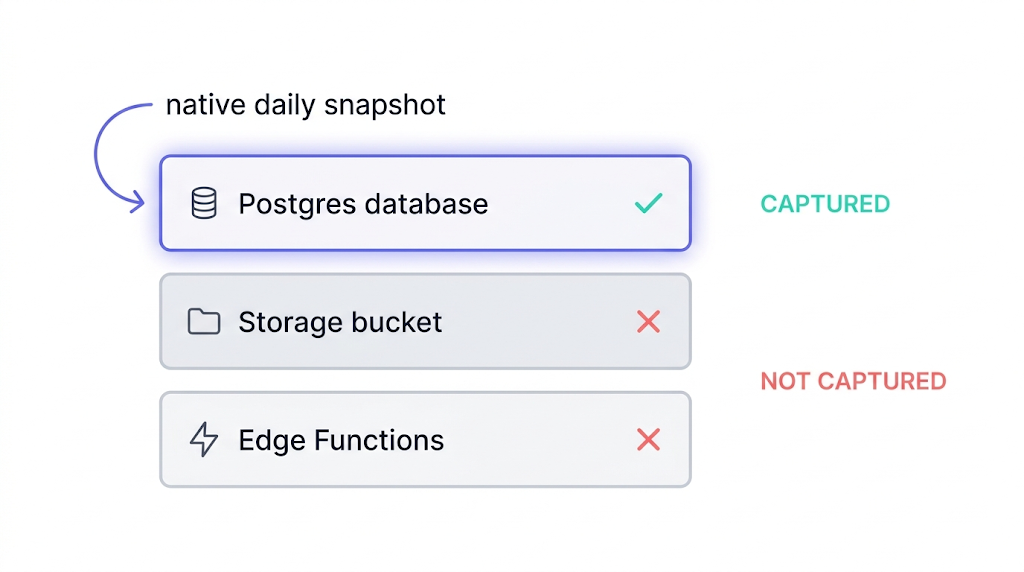
Scope at a glance
Here's the coverage in one scannable table. The version of this table we wish Supabase's pricing page would publish:
| Part of your project | In the native snapshot? |
|---|---|
| Postgres database (tables, rows, indexes) | Yes |
| Postgres roles and privileges | Yes, as part of the volume |
storage.objects table (file metadata) | Yes |
| Storage bucket contents (the actual files) | No |
| Edge Functions source code | No |
| Edge Functions secrets | No |
supabase/config.toml | No |
| Auth provider credentials (Google, GitHub OAuth) | No |
| Custom auth email templates | No |
| Webhook signing secrets | No |
| JWT secret | No |
| Custom SMTP configuration | No |
| Site URL, CORS, rate limits | No |
| Backup itself (survives project deletion) | No |
If you're running self-hosted Supabase via Docker Compose, every row in this table is a "no," because self-hosted has no native backup at all. The rest of this article covers the cloud-hosted gaps. Self-hosted users need a complete backup strategy from scratch.
That's the shape of the gap. Now the details of each row that's a "no."
Gap #1: Your Storage buckets
This is the biggest gap, and the one most teams don't know about until the moment it's inconvenient.
Why Storage isn't in the snapshot
Supabase Storage is architecturally separate from your Postgres database. It's an S3-compatible object store that sits next to your project, not inside it. The physical snapshot that makes up your daily backup captures the Postgres volume. It does not capture the Storage bucket.
What that means in practice:
- If you accidentally delete a bucket, the daily backup will not bring it back.
- If an API key leaks and someone deletes 10,000 user-uploaded files, the daily backup will not bring them back.
- If Storage itself has an incident (we've seen this on other managed providers; Supabase's track record is good, but "good" is not "always"), the daily backup will not bring it back.
The metadata trap
The subtle version of this trap is that the Postgres database does back up the storage.objects table. That table records metadata about every object: file path, content type, size, owner. But the actual bytes of the files live in the S3 backend, and they aren't part of the physical snapshot.
So after a Storage incident, your database can cheerfully tell you that /avatars/user-123.png exists and is 48 KB, while the file itself is gone.
Am I even using Storage?
The first thing to check is whether your project uses Storage at all. Many do without the team realizing, because auth avatars, email attachments, and generated reports often end up there.
This query answers the question:
select
  b.name as bucket,
  count(o.id) as object_count,
  pg_size_pretty(sum(o.metadata->>'size')::bigint) as total_size
from storage.buckets b
left join storage.objects o on o.bucket_id = b.id
group by b.name
order by object_count desc;
If the count is zero everywhere, you're not using Storage and this gap doesn't apply. If it isn't, the gap applies.
The pg_dump trap
Here's the version of the trap that bites teams who thought they had Storage covered. A pg_dump of a Supabase project happily serializes the storage.objects table, because that table is in the database:
pg_dump --host="aws-0-eu-central-1.pooler.supabase.com" --port=6543 --username="postgres.${PROJECT_REF}" --format=custom --file="supabase-$(date +%F).dump" postgres
Run this, and you'll get a clean .dump file that contains every row of storage.objects. The file metadata, the content types, the sizes, the owners. The actual file bytes are in the S3 backend, which pg_dump never touches.
A restore of this dump will re-create the storage.objects table and tell your application that /avatars/user-123.png is a 48 KB PNG owned by user 123, and your application will happily render an <img> tag pointing to a URL that 404s.
The Postgres side of the Storage gap is underappreciated. Because the storage.objects table backs up with the database, a native restore can leave you with a database that thinks it has files that no longer exist anywhere. The symptom is broken image URLs and 404s on user-uploaded content after an otherwise-successful restore. Worth knowing before it happens.
The workaround
An independent backup of the bucket contents, either by script against Supabase's S3-compatible API, or by a managed service. We cover the script path in detail in How to back up Supabase Storage buckets.
The short version: Supabase exposes S3-compatible endpoints, you can run aws s3 sync against them, and the rest is a cron job and a storage provider of your choice. When it's time to bring those files back, the restore is also a two-step job: file bytes via the S3 API, and metadata rows via pg_restore. How to restore Supabase Storage objects walks through both steps, including the reconciliation check that surfaces mismatches between the two layers.
Gap #2: Your Edge Functions (and their secrets)
Edge Functions run on Supabase's Edge Runtime. They are not part of the database volume, so they are not part of the snapshot.
There are three things inside an Edge Function that you care about backing up, and they have three different answers.
| Thing | Backed up natively? | Where it should live |
|---|---|---|
| Function source code | No | Git, always |
supabase/config.toml | No | Git, always |
| Secrets (env vars) | No | External secret manager or encrypted backup |
Your code belongs in Git
The first two rows are the answer most teams give themselves when they think about Edge Function backup: "our code is in Git, we're fine."
They're half right. The source code is covered as long as Git is covered, which for most teams means GitHub, which means you've inherited GitHub's backup posture. Fine for most; not fine for audit-ready SOC 2.
Your secrets need their own plan
The third row is where teams get caught. Secrets set via supabase secrets set FOO=bar are stored inside the Supabase project. They're not in Git (correctly, you shouldn't put them there). They're also not in any backup.
If your project is deleted, your secrets are gone with it.
The pragmatic rule we recommend:
- All function source and config lives in Git. Not optional.
- Secrets are set in Supabase, but the canonical list of "what secrets should exist" lives in a checked-in
.env.example, and the actual values live in a secret manager (Doppler, 1Password, AWS Secrets Manager, HashiCorp Vault, pick one). - Write a small script that reads the secret manager and calls
supabase secrets setto reconstitute the project's secrets from scratch. Test it.
A secret manager you can't re-apply to a project under time pressure is a diary, not a backup. The re-apply script is the part nobody writes until it's too late.
For the step-by-step walkthrough on all three surfaces (pulling function source into Git, exporting deploy config via CLI, and documenting secrets so you can reconstitute them after a restore), see How to back up Supabase Edge Functions.
Gap #3: Project-level configuration and auth
Beyond the database and Storage and Edge Functions, a Supabase project has a long tail of configuration state that lives in the dashboard, gets wired up over months, and is not part of the physical snapshot.
The offenders
- Auth provider credentials. OAuth client IDs and secrets for Google, GitHub, Apple, Discord, etc. Set once, ignored forever, not backed up.
- Custom email templates. If you customized the magic-link, recovery, or invitation emails, those templates live in the project config.
- Rate limits, CORS settings, site URLs.
- Webhook signing secrets for database webhooks.
- Custom SMTP configuration for auth emails.
- JWT secret. The big one. Rotate this or lose it, and every existing token in the wild becomes invalid.
The JWT secret
Of everything in this list, the JWT secret is the one that matters most. Losing it signs out every user you have. Regenerating it without a plan breaks every client that's already authenticated. Treat it like a production database credential: rotate it deliberately, store it in a secret manager, and never let it live only in the Supabase dashboard.
The workaround
Tedious but finite. Once a project is considered production, export this configuration to a checked-in document or a secret manager, depending on sensitivity, and keep it up to date.
The honest truth is that almost nobody does this, and the first time most teams think about it is after a project-level incident.
Gap #4: The retention cliff
On Pro you have 7 days. On Team, 14. On Enterprise, 30.
What happens on day 15? Nothing. The oldest backup rolls off. Permanently.
Fast failures vs slow failures
Short-retention daily backups are fine for acute disasters. "I dropped a table ten minutes ago." Snapshot from yesterday, restore, done.
They're a disaster for slow-burn disasters, which is the shape of most real data-loss incidents we see. A subtle bug corrupts a column in a rarely-queried table. You notice three weeks later when a customer reports their analytics look off. Your Pro plan's oldest backup is from 7 days ago. The corruption started before that. The backup is no help.
Schema migrations are a separate high-risk moment: they're an acute change, but the 24-hour RPO means your most recent clean snapshot can be many hours older than the migration. If the migration fails or produces wrong results, the daily snapshot won't give you a restore point from ten minutes ago. How to back up Supabase before a migration covers the targeted pg_dump procedure for this specific scenario.
PITR doesn't change the shape
PITR changes the math but doesn't change the shape of the problem. PITR gives you second-by-second granularity inside its retention window, but that window is itself finite: typically 7 days on Pro, 14 on Team, 28 on Enterprise as a paid add-on. The same "discovered three weeks later" scenario still finds you outside PITR's window. And even within the PITR window, coverage is Postgres-only: Storage and Edge Functions remain uncovered regardless. When you actually need Supabase PITR maps the scenarios where PITR is worth the cost and when daily snapshots are sufficient.
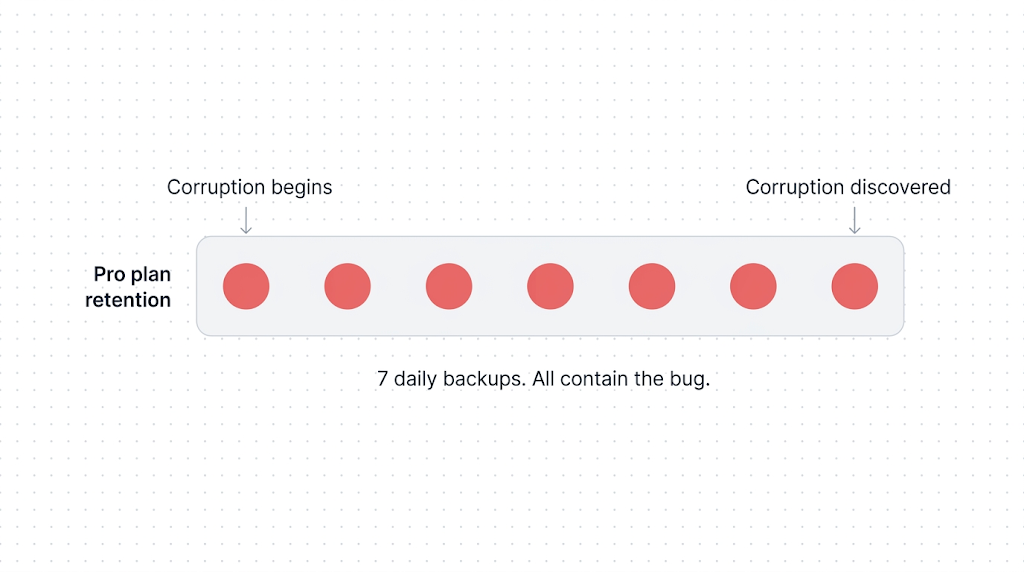
The real mitigation for the retention cliff isn't a longer retention window. It's an independent, longer-lived archive, typically weekly or monthly logical backups, stored on a different provider, with a retention measured in months or years, not days.
The scenario
Consider a team on Pro that silently starts deduping customer records on import. Eleven days later, someone notices. Native backup gives them a clean snapshot from every day in its 7-day window. All of those snapshots already contain the bug.
An off-site weekly pg_dump from 14 days prior would be the backup that matters. They would not have had that backup if they had trusted native retention alone. If you are in a situation right now where data looks wrong or missing, what to do when Supabase data disappears is the incident-response checklist to run before calling it unrecoverable.
If you take one thing from this section: daily snapshots with short retention protect you against fast failures. They do not protect you against slow failures. Plan for both.
Gap #5: Project deletion and project pause
Two different failure modes, same outcome: the backups go away with the project.
Project deletion
If you delete a Supabase project (intentionally or as a result of a compromised account), the backups go with it. The Supabase docs on backups are explicit: the data and associated backups are permanently removed from S3. No grace period. No support-ticket recovery path for intentional deletion.
The worst version of this is an account-compromise scenario. An attacker with dashboard access can delete a project in a few clicks, and the backups are deleted as part of the same operation. Native backup offers zero protection against this class of failure.
The only protection is an off-site backup under separate credentials that the attacker doesn't control.
Free-tier project pause
This one is specific to the Free tier. Free projects pause after 7 days of inactivity. From there, you have a 90-day window to one-click restore the project from the Supabase dashboard. After 90 days, the one-click restore disappears, though backups can generally still be downloaded manually.
That is the documented behaviour. The caveats:
- Free tier has no automated daily backups during normal operation. Whatever gets restored from a paused project reflects the state at pause, not a rolling window of recovery points.
- "Generally still be downloaded" is a docs phrase, not an SLA. If the moment you need to recover falls on the wrong side of some internal policy change, you are negotiating with support, not pulling from a cron-job archive.
- The 7-day and 90-day numbers can change. They are current documented behaviour, not contractual guarantees. Always check the Supabase docs on backups for the current rules before leaning on them.
Our posture on Free
Treat any Free-tier project as production-unsafe. The documented pause-and-restore path is generous for experiments and prototypes, but it is not a backup strategy. If the data matters at all, run one weekly pg_dump to an S3 bucket you own. It is free for small databases and gives you a recovery path that does not depend on Supabase's pause policy staying exactly where it is today.
The honest takeaway: if your project is Free, you do not have rolling daily backups, and your recovery path is gated on a documented policy that can evolve. For the step-by-step on unpausing, verifying your data after the project resumes, and protecting the project from the next pause cycle, see Supabase free tier paused: what's happening and what to do. For the full picture of what's actually on disk after a pause, what's recoverable, what isn't, and how to prevent it next time, Recovering a paused or deleted Supabase project covers the complete walkthrough.
Gap #6: The off-site gap
Native backups are managed by Supabase inside the platform. That is the right default for fast recovery. It also means an independent copy, in a region and cloud you choose, is something you add yourself.
When this matters
Regional outages are rare, and historically short when they do happen. But relying on one provider's managed backups alone is not fine for three scenarios we see regularly:
- Compliance frameworks that require geographical separation. ISO 27001's annex A.17.2.1 expects redundancy sufficient to meet stated availability requirements, which is almost impossible to defend under audit if you can't show where your backup lives and that it is separate from production. SOC 2 auditors increasingly ask the same question.
- Business continuity plans that explicitly assume a region can be unavailable. A BCP that fails the "what if the region is down?" question on page one is a BCP that won't survive its first review.
- Cross-cloud portability. The quieter version of business continuity: if Supabase as a service were unavailable for a week, or if your account were locked out of the dashboard, could you stand your application up somewhere else with the data you have? If your only backup lives inside Supabase, the answer is no.
The workaround
Native backup on its own doesn't close any of the three, because the copy isn't independent of the platform.
The fix is an off-site logical backup written to an object store you control in a region or cloud different from your project's.
The lightest-touch version is a weekly pg_dump to an S3 bucket you own, in a different region to your Supabase project, with its own lifecycle policy. That one cron job closes ISO 27001's geographical-separation question, gives your BCP a defensible answer, and starts building the cross-cloud posture even before you decide you need it.
How to back up your Supabase Postgres database walks through the script. Cross-region Supabase backup for compliance covers the full multi-region setup, including destination region selection, storage provider options, and how to document the process for an auditor.
Why these gaps matter for SOC 2, ISO 27001 and GDPR
Supabase itself is certified for SOC 2 Type II, GDPR, and ISO 27001 for the service they run.
Their compliance does not automatically transfer to your compliance story. Your backup strategy is a separate evaluation.
The honest mapping
Here is how native backup measures against the common framework asks. The right-hand column is a paraphrase, not a verbatim quote; check the controls directly before citing in an audit.
| Framework | What it asks about backup | Native alone? |
|---|---|---|
| SOC 2 (Common Criteria) | Backup processes are in place, tested, and documented | Partial. Untested by default. |
| SOC 2 (A1.2) | Environmental protections, software, data back-up processes, and recovery infrastructure designed for availability | Partial, no off-site. |
| ISO 27001 (A.12.3.1) | Backup copies of information, software, and system images are taken and tested regularly | Partial, no geographical separation. |
| ISO 27001 (A.17.2.1) | Information processing facilities have redundancy sufficient to meet availability requirements | No. |
| GDPR Art. 32 | Ability to restore the availability and access to personal data in a timely manner | Partial. |
The pattern: native backup on its own is almost never enough to satisfy any of these controls cleanly.
What auditors actually ask
Auditors reliably ask two questions that native can't answer well:
- Where is the backup physically stored, relative to the primary?
- When was the last successful restore test?
Question 1 is the off-site gap. Native backup, by design, stores the snapshot next to the thing it's backing up. That's a fine architectural choice for fast restores and a poor answer to an auditor asking about geographical separation.
Question 2 is on you regardless. Nothing in Supabase's dashboard forces you to test a restore, and nothing logs the result if you do. A backup you haven't tested is a backup you're trusting on reputation. If you want the concrete verification ladder for that step, read How to automate Supabase backup verification.
The auditor-friendly posture
For any of these frameworks, the answer auditors want to see is multi-cloud or multi-provider backup. Your primary data lives in one place; your backup copy lives in a different cloud, a different region, and ideally under different credentials. A pg_dump from your Supabase project written to an S3 bucket in a separate AWS account, or to a non-AWS object store (Backblaze B2, Cloudflare R2, Wasabi), closes the geographical-separation question, the cross-cloud portability question, and the account-compromise protection question in one move. Native backup cannot give you any of the three. Hosting your backups on the same provider as your primary data is the single most common finding in a bad audit.
Plan for compliance before the audit, not during it. The difference between a scramble and a clean pass is usually six weeks of lead time and one documented multi-provider backup strategy.
We have more on each of these in GDPR-compliant Supabase backup and Automating backup verification.
A complete-backup checklist for a Supabase project
Here's what a "complete" backup posture for a production Supabase project looks like. Native covers part of it. The rest is on you.
| Asset | Native covers? | What to do |
|---|---|---|
| Postgres database | Yes (daily snapshot) | Add weekly off-site pg_dump for retention beyond the cliff |
| Point-in-time recovery | Only if paid add-on | Evaluate against your RPO |
| Storage buckets | No | Script against S3-compatible API, off-site |
| Edge Functions source | No | Git is your backup |
| Edge Functions secrets | No | Secret manager + re-apply script |
| Auth OAuth credentials | No | Document in a secret store |
| Auth email templates | No | Check into repo as strings |
| Custom SMTP config | No | Document |
| JWT secret | No | Secret manager; critical |
| Webhook secrets | No | Secret manager |
| Site URL, CORS config | No | Document |
| Off-site copy (any region) | No | Required for BCP/ISO 27001 |
| Tested restore | No | Required; automate |
The specific tools don't matter. Git, a secret manager, an object store in a different region, a cron job, and a documented restore procedure will get you 90% of the way there. The other 10% is testing.
What to do next
If the only thing you change after reading this is to open your project dashboard and verify which of the six gaps apply to you, that's enough. Most projects have at least three. Very few have zero.
The short version
Keep Git for code, add a secret manager for env vars and OAuth credentials, script an off-site weekly pg_dump, script a Storage bucket sync to an object store you own, and run a restore test every quarter. That's the playbook. When your pg_dump script throws an error, common Supabase backup failures and fixes covers the most frequent failure modes, from version mismatch to silent truncation, with the fix for each.
If you're weighing a DIY pg_dump script against a managed service specifically, pg_dump vs. managed Supabase backup breaks down the real cost and tradeoffs. For the specific head-to-head between native backup and SimpleBackups, including the honest answer to when native is genuinely enough for your project, see Supabase native backup vs. SimpleBackups. For the full tool landscape, our Supabase backup tools comparison puts native backup, SimpleBackups, and DIY scripting side by side across every coverage dimension.
SimpleBackups for Supabase complements Supabase's native backups. If you want off-site Postgres and Storage backups, Edge Functions versioning, automated verification, and a compliance log without writing any of it yourself, that's what it does. If you'd rather script it, every gap above has an article in the complete guide with the script.
Keep learning
This article is the first piece of a larger cluster we're shipping over the coming weeks. Follow the hub to see what's published.
- How Supabase's native backup actually works, the mental model this article assumes. Worth reading if any section here felt abstract.
- How to back up your Supabase Postgres database, the script-first how-to for closing the retention-cliff gap.
- How to back up Supabase Storage buckets, because this is the biggest single gap for most projects.
- Supabase native backup vs. SimpleBackups, the honest side-by-side including when native is genuinely enough.
- How to back up your Supabase Postgres database, the deep-dive on
pg_dumpagainst a Supabase project.
FAQ
Does Supabase back up my Storage buckets?
No. Supabase's native daily backup is a physical snapshot of the Postgres database volume only. Storage objects live in a separate S3-compatible backend and are not included in the snapshot, which means a native restore will not bring them back. Storage requires its own backup, either a script against Supabase's S3-compatible API or a managed off-site backup service.
What happens to my backups if I delete my Supabase project?
The backups are deleted with the project. Supabase support can sometimes recover a deleted project inside a short grace period, but the grace period is not a guarantee, and you are dependent on support response time. The only reliable protection against project deletion, including from a compromised account, is an off-site backup stored under separate credentials.
Are my Edge Functions backed up?
No. Edge Function source code, configuration files, and secrets are not part of Supabase's native backup. Source code and config should live in Git. Secrets should live in a separate secret manager, with a re-apply script that can reconstitute them on a new project. Git alone is not a complete Edge Functions backup strategy.
Does PITR cover Storage?
No. Point-in-Time Recovery is a database-level feature that replays Postgres Write-Ahead Logs. It does not touch Supabase Storage. Adding PITR to your plan gives you finer-grained recovery of database state, but the Storage gap is unchanged and still requires its own off-site backup.
Can I download a Supabase native backup?
No. Native backups are physical volume snapshots managed by Supabase's infrastructure. They can be used to restore onto the same project or a new project, but they cannot be downloaded as a file. If you need a portable backup you can move between providers or archive for long-term retention, you need a logical backup via pg_dump.
This article is part of The complete guide to Supabase backup, an honest, practical reference from the team that backs up Supabase every day.