

Cloud-hosted Supabase gives you daily snapshots on paid plans. Self-hosted Supabase gives you nothing. No dashboard toggle, no retention window, no automated restore point. If you run Supabase via Docker Compose or Kubernetes, every backup decision is yours.
This guide walks through backing up every layer of a self-hosted Supabase stack: the Postgres database, Storage volumes, .env files, service configs, and secrets. You will get working commands for each layer and a cron-based script that ties them together.
What's different about self-hosted Supabase backup
When you run Supabase on their cloud platform, you get native daily backups with plan-based retention. Free gets nothing, Pro gets 7 days, Team gets 14 days. The backup is a physical snapshot of the Postgres volume, and restoring it is a one-click operation in the dashboard.
Self-hosted Supabase has none of that. The official self-hosting docs cover spinning up the Docker Compose stack, but backup is entirely your responsibility. There is no built-in scheduler, no snapshot mechanism, and no retention policy.
This gap is bigger than it sounds. Cloud-hosted Supabase already leaves Storage, Edge Functions, and certain metadata out of the native snapshot. Self-hosted leaves everything out, because there is no snapshot at all.
If you're evaluating whether self-hosted Supabase is worth the operational overhead, backup is one of the highest-effort items. Cloud-hosted at least gives you a baseline. Self-hosted gives you a blank slate.
The backup surface: database, Storage, configs, secrets, and Docker volumes
A self-hosted Supabase stack runs 10+ containers. Not all of them carry state. The table below maps the components that do, and the backup method for each.
| Component | What it holds | Backup method |
|---|---|---|
Postgres (supabase-db) | All application data, auth tables, storage.objects metadata | pg_dump from inside or against the container |
| Storage volume | Actual file bytes (images, uploads, documents) | File-level copy of the Docker volume or bind mount |
GoTrue (supabase-auth) | JWT secrets, auth provider configs | Back up .env and docker-compose.yml |
PostgREST (supabase-rest) | API schema cache config | Back up docker-compose.yml environment variables |
| Realtime | Ephemeral (WebSocket state) | No backup needed |
| Kong / API gateway | Routing rules | Back up kong.yml or equivalent config file |
.env file | Database passwords, JWT secret, API keys, SMTP credentials | File copy, encrypted at rest |
docker-compose.yml | Service topology, volume mappings, resource limits | Version control (git) |
| Custom migrations | SQL files applied via supabase db push or manually | Version control (git) |
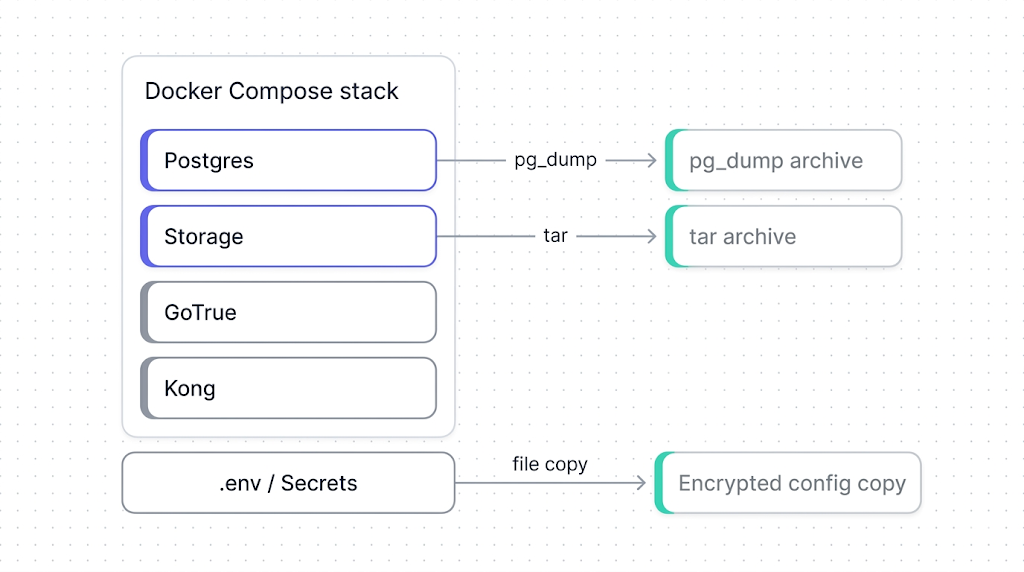
The storage.objects table in Postgres holds file metadata (paths, MIME types, ownership). The actual file bytes live in a separate volume. If you restore only the database, you get metadata pointing to files that no longer exist: broken image URLs, 404s on downloads.
Backing up Postgres in a Docker/Compose setup
The database is the most critical layer. Self-hosted Supabase runs Postgres in a container typically named supabase-db. You back it up with pg_dump, the same tool you would use for any Postgres instance.
Run pg_dump inside the container:
docker exec -t supabase-db pg_dump -U supabase_admin -d postgres --format=custom --file=/tmp/supabase-db-$(date +%F).dump
Then copy the dump out of the container:
docker cp supabase-db:/tmp/supabase-db-$(date +%F).dump ./backups/supabase-db-$(date +%F).dump
--format=custom gives you a compressed, restorable archive. Avoid --format=plain for anything but debugging: plain-text dumps can't do selective restores and are significantly larger.
For a deeper walkthrough of Postgres backup and restore inside Docker, see the Docker Postgres backup guide. The same patterns apply here. The Supabase-specific detail is the username (supabase_admin by default) and the fact that the database name is postgres unless you changed it in your .env.
If you want the standalone pg_dump guide for Supabase's Postgres specifically, see backing up Supabase Postgres.
Docker volume mounts and named volumes have different backup approaches. If your docker-compose.yml uses a named volume (supabase-db-data:), you back it up with docker run --rm -v (shown below). If it uses a bind mount (./volumes/db/data:/var/lib/postgresql/data), you copy the directory directly.
Alternatively, if your Postgres data lives in a named Docker volume, you can back up the volume directly:
docker run --rm -v supabase_supabase-db-data:/source:ro -v $(pwd)/backups:/backup alpine tar czf /backup/pg-volume-$(date +%F).tar.gz -C /source .
This is a raw file-level backup. It is faster than pg_dump for large databases but requires the container to be stopped for consistency. For most self-hosted setups, pg_dump while the container is running is the safer default.
Backing up Storage volumes
Supabase Storage in a self-hosted setup stores file bytes on disk, either in a named Docker volume or a bind-mounted directory. The approach depends on which your docker-compose.yml uses.
For a bind mount (e.g., ./volumes/storage:/var/lib/storage):
tar czf ./backups/storage-$(date +%F).tar.gz -C ./volumes/storage .
For a named volume:
docker run --rm -v supabase_storage-data:/source:ro -v $(pwd)/backups:/backup alpine tar czf /backup/storage-$(date +%F).tar.gz -C /source .
For the S3-compatible API approach to backing up Supabase Storage, see backing up Supabase Storage.
The key thing to verify after a Storage backup: check that the file count in the archive matches what storage.objects reports in Postgres. A mismatch means either the backup missed files written during the archive operation, or orphaned metadata exists in the database.
tar tzf ./backups/storage-$(date +%F).tar.gz | wc -l
docker exec supabase-db psql -U supabase_admin -d postgres -c "SELECT count(*) FROM storage.objects;"
If the counts diverge significantly, stop the Storage container before archiving for a consistent snapshot.
Backing up .env, configs, and secrets
This is the layer people forget. The database and Storage volumes contain your data. The .env file and config files contain the keys to unlock it.
A self-hosted Supabase stack typically has these config files worth backing up:
tar czf ./backups/configs-$(date +%F).tar.gz .env docker-compose.yml volumes/api/kong.yml volumes/functions/ volumes/db/init/
GoTrue's JWT secret and the ANON_KEY / SERVICE_ROLE_KEY live in your .env file. If you lose these and restore your database to a new instance with freshly generated keys, every existing JWT token becomes invalid and every client-side API call breaks. Back up .env and encrypt it at rest.
For Edge Functions and custom server-side logic, back up the volumes/functions/ directory. This is where Deno-based functions live in a self-hosted setup. See backing up Supabase Edge Functions for the cloud-hosted equivalent.
These config files should also live in version control. But version control is not a backup: if someone force-pushes, rebases, or the repo host has an outage, your config history could be gone. A file-level backup alongside your data backups closes that gap.
Automating self-hosted Supabase backups
Running these commands manually is fine for a one-off. For production, you want a script that runs on a schedule, covers all layers, and fails loudly if something goes wrong.
Here is a minimal backup script that ties the previous sections together:
#!/usr/bin/env bash
set -euo pipefail

BACKUP_DIR="/opt/supabase-backups/$(date +%F)"
COMPOSE_DIR="/opt/supabase"
RETENTION_DAYS=30

mkdir -p "$BACKUP_DIR"

# 1. Postgres
docker exec -t supabase-db pg_dump -U supabase_admin -d postgres --format=custom --file=/tmp/supabase-db.dump

docker cp supabase-db:/tmp/supabase-db.dump "$BACKUP_DIR/supabase-db.dump"

# 2. Storage volume
tar czf "$BACKUP_DIR/storage.tar.gz" -C "$COMPOSE_DIR/volumes/storage" .

# 3. Configs and secrets
tar czf "$BACKUP_DIR/configs.tar.gz" -C "$COMPOSE_DIR" .env docker-compose.yml volumes/api/kong.yml volumes/functions/

# 4. Upload to off-site storage (replace with your target)
aws s3 cp "$BACKUP_DIR" "s3://my-backups/supabase/$(date +%F)/" --recursive --storage-class STANDARD_IA

# 5. Prune old local backups
find /opt/supabase-backups -maxdepth 1 -type d -mtime +$RETENTION_DAYS -exec rm -rf {} +

echo "Backup completed: $BACKUP_DIR"
Schedule it with cron:
0 3 * * * /opt/supabase/backup.sh >> /var/log/supabase-backup.log 2>&1
The script runs at 03:00 UTC daily, uploads to S3, and prunes local copies older than 30 days. Adjust RETENTION_DAYS and the S3 path to match your environment.
Two things this script does not do: it does not verify the backup is restorable, and it does not alert you when it fails. For verification, you need a separate restore-test step. For alerting, pipe failures to your monitoring system, or use a tool that handles both.
Why off-site matters
A backup sitting on the same server as your Supabase stack is not a backup. It is a copy. If the disk fails, the VM is terminated, or the host is compromised, both your data and your "backup" disappear together. Always push at least one copy to a different region or provider.
Restoring a self-hosted Supabase instance
Backing up is the easy part. The real test is whether you can restore. Here is the sequence for bringing a self-hosted Supabase stack back from a backup.
1. Stop the stack:
cd /opt/supabase && docker compose down
2. Restore configs:
tar xzf /path/to/backup/configs.tar.gz -C /opt/supabase
3. Restore Storage volumes:
tar xzf /path/to/backup/storage.tar.gz -C /opt/supabase/volumes/storage
4. Start Postgres only:
docker compose up -d supabase-db
5. Restore the database:
docker cp /path/to/backup/supabase-db.dump supabase-db:/tmp/supabase-db.dump

docker exec -t supabase-db pg_restore -U supabase_admin -d postgres --clean --if-exists /tmp/supabase-db.dump
6. Start the rest of the stack:
docker compose up -d
7. Verify:
Check that the API responds, auth tokens work, and Storage files load. The fastest smoke test:
curl -s http://localhost:8000/rest/v1/ -H "apikey: $ANON_KEY" | head -c 200
If the API returns a schema response, PostgREST connected to Postgres successfully and the core stack is functional.
What to do next
You have a working backup for every layer of your self-hosted Supabase stack. The next step is to test the restore. Schedule a monthly restore drill to a separate environment. The drill is the only proof that your backups actually work.
If scripting and scheduling all this yourself sounds like a second job, SimpleBackups handles Supabase Postgres and Storage backups off-site, with alerts when a run fails. See how it works →
Keep learning
- How Supabase's native backup works: understand what cloud-hosted gives you that self-hosted doesn't.
- What Supabase's native backup doesn't cover: the gaps that apply to cloud-hosted, all of which are worse on self-hosted.
- Docker Postgres backup and restore guide: the foundational reference for running pg_dump inside containers.
- The complete guide to Supabase backup: the hub page for the full Supabase backup cluster.
FAQ
Does self-hosted Supabase have any built-in backup?
No. Self-hosted Supabase does not include any backup mechanism. Unlike cloud-hosted Supabase which provides daily snapshots on paid plans, self-hosted deployments require you to implement backup entirely on your own.
How do I back up Supabase running in Docker Compose?
Run pg_dump against the Postgres container for the database, archive the Storage volume with tar, and copy your .env and config files. A cron-based script can combine all three layers into a single scheduled job.
Can I use pg_dump inside a Docker container?
Yes. Use docker exec to run pg_dump inside the supabase-db container with --format=custom for a compressed archive, then docker cp the dump file out of the container.
How do I back up Supabase Storage volumes in Docker?
For bind mounts, archive the directory with tar. For named volumes, use docker run with an Alpine container to mount the volume read-only and create a tar archive.
What config files do I need to back up for self-hosted Supabase?
At minimum: .env (JWT secrets, API keys, database passwords), docker-compose.yml, kong.yml (API gateway routes), and the volumes/functions/ directory for Edge Functions. Losing .env means losing the keys that validate existing tokens.
Can SimpleBackups back up a self-hosted Supabase instance?
Yes. SimpleBackups can connect to the Postgres instance exposed by your self-hosted stack and run scheduled off-site backups with automated verification and alerts.
This article is part of The complete guide to Supabase backup, an honest, practical reference from the team that backs up Supabase every day.