

If you want to automate Supabase backup verification, start by separating "backup finished" from "backup is restorable." Those are not the same event. A cron job can exit 0, upload a file, and still leave you with a truncated dump, a broken archive, or a restore that dies halfway through.
That gap matters whether you're filling the holes in what Supabase's native backup doesn't cover or adding an independently testable layer on top of how Supabase's native backup actually works. This article gives you a practical verification ladder you can automate tonight: file checks, archive validation, disposable restores, and data comparisons that prove the backup is worth trusting.
The posture
A backup you haven't tested isn't a backup. It's a hope. Verification is the part that turns "we have files" into "we have a recovery path."
After reading this, you'll know which checks to run on every backup, which ones to run daily or weekly, and how to alert on the failures that actually matter.
Why verification matters more than the backup itself
Supabase's own backups documentation makes an important distinction: native backups are physical backups, and if you want a logical export you generate it yourself with the CLI or pg_dump. That means the moment you leave the platform-managed path and start building your own off-site safety net, verification becomes your job too.
The reason this matters is simple. Physical snapshots inside Supabase are convenient, but they are not independently inspectable in the way a dump file is. Logical backups are the opposite. You can store them anywhere, hash them, parse them, restore them, and compare them. That portability is exactly why teams want them. It is also why teams need to verify them.
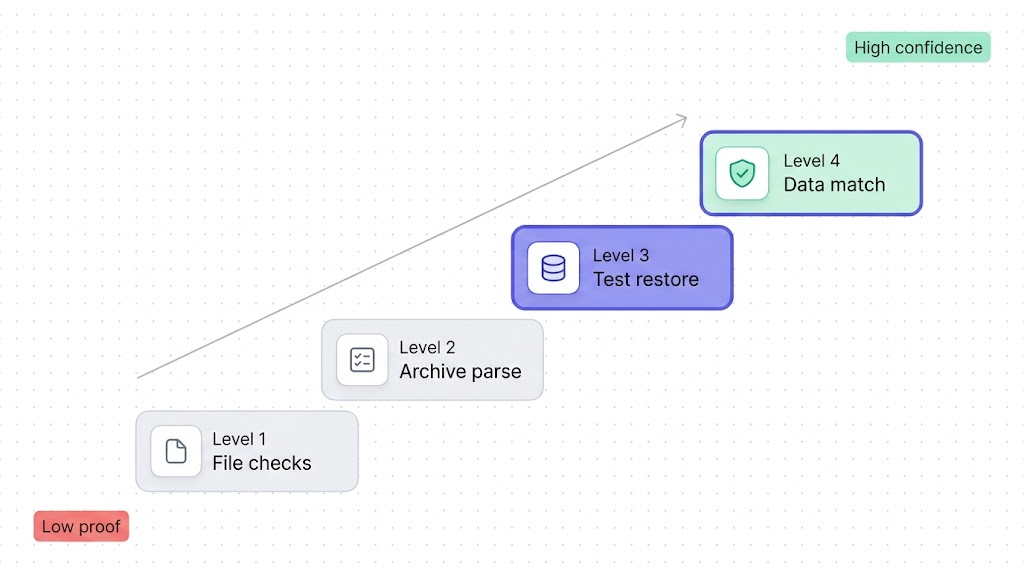
Here's the practical model we use:
| Level | What it proves | Typical cadence | What it does not prove |
|---|---|---|---|
| 1. File checks | A file exists, is large enough, and matches the expected format | Every run | That it restores |
| 2. Archive parse | The dump can be opened by pg_restore | Every run | That data loads cleanly |
| 3. Test restore | A real restore completes in a disposable database | Daily or nightly | That every important table is correct |
| 4. Data consistency | Critical tables and spot checks match the source | Weekly, before migrations, after major changes | Long-term business correctness |
The mistake is stopping at Level 1 because it feels concrete. It is concrete. It is also the weakest possible signal.
Level 1: File integrity checks (size, checksum, format)
Level 1 is your cheapest filter. It catches the obvious failures early: zero-byte files, partial uploads, wrong extensions, corrupted compression, and sudden size drops after a script change. If you're already following How to back up your Supabase Postgres database, this is the first verification step that should run immediately after the backup job writes the file.
#!/usr/bin/env bash
set -euo pipefail

BACKUP_PATH="$1"
MIN_BYTES=$((50 * 1024 * 1024)) # adjust to your project
ACTUAL_BYTES="$(wc -c < "$BACKUP_PATH")"

test -s "$BACKUP_PATH"

if [ "$ACTUAL_BYTES" -lt "$MIN_BYTES" ]; then
  echo "Backup is unexpectedly small: $ACTUAL_BYTES bytes"
  exit 1
fi

openssl dgst -sha256 "$BACKUP_PATH"

case "$BACKUP_PATH" in
  *.gz)
    gzip -t "$BACKUP_PATH"
    ;;
  *.dump)
    file "$BACKUP_PATH" | grep -qi "PostgreSQL custom database dump"
    ;;
  *.sql)
    head -n 5 "$BACKUP_PATH" | grep -Eq "PostgreSQL database dump|SET statement_timeout"
    ;;
esac

echo "Level 1 checks passed for $BACKUP_PATH"
Four rules make Level 1 useful instead of cosmetic:
- Compare against a minimum size that reflects your real project, not
> 0. - Emit a checksum so you can compare local and off-site copies.
- Test the container format (
gzip -t,file, or both) instead of trusting the filename. - Store the size and checksum in your logs so regressions are visible over time.
A backup that passes Level 1 but fails Level 3 is worse than no backup, because your team starts trusting it. Level 1 is a gate, not a certificate.
Level 2: Schema validation (can pg_restore parse it?)
If your backup format is custom, directory, or tar, PostgreSQL's docs say pg_restore --list reads the archive's table of contents. That's a useful second gate. If pg_restore cannot even enumerate the archive, you already know the file is broken before wasting time on a full restore.
#!/usr/bin/env bash
set -euo pipefail

BACKUP_PATH="$1"
TOC_FILE="$(mktemp)"

pg_restore --list "$BACKUP_PATH" > "$TOC_FILE"

grep -q "TABLE DATA" "$TOC_FILE"
grep -q "SCHEMA" "$TOC_FILE"

echo "Archive parsed successfully"
rm -f "$TOC_FILE"
This check is narrow by design. It proves the archive is structured well enough for pg_restore to read its contents. It does not prove the restore will succeed against a real target, and it does not apply to plain SQL dumps produced by the Supabase CLI split-dump workflow.
For plain SQL, the equivalent move is a parse-only restore into a disposable database with psql --single-transaction --variable ON_ERROR_STOP=1. If you want the background on when to use pg_dump, pg_restore, or the CLI split-dump path, our pg_dump and pg_restore guide is the right reference.
Level 3: Test restore to a staging database
This is the level where confidence gets real. A file can be non-empty and parseable and still fail once indexes, triggers, ownership, extensions, or data volume enter the picture. The only honest answer is a restore test. It's also the specific evidence GDPR auditors look for: if you're building a GDPR-compliant Supabase backup setup, a dated restore test log is one of the three documents that decides whether you pass or fail.
The cheapest repeatable version is a disposable Postgres instance on the same major version as your Supabase project. For a full platform restore workflow, see How to restore a Supabase database. For nightly verification, a throwaway container catches most failures fast enough.
#!/usr/bin/env bash
set -euo pipefail

BACKUP_PATH="$1"
RESTORE_DB="verify_restore"
CONTAINER="supabase-restore-check"

docker run --rm -d \
  --name "$CONTAINER" \
  -e POSTGRES_PASSWORD=postgres \
  -p 55432:5432 \
  postgres:15

cleanup() {
  docker rm -f "$CONTAINER" >/dev/null 2>&1 || true
}
trap cleanup EXIT

until pg_isready -h 127.0.0.1 -p 55432 -U postgres >/dev/null 2>&1; do
  sleep 1
done

createdb -h 127.0.0.1 -p 55432 -U postgres "$RESTORE_DB"
pg_restore \
  --exit-on-error \
  --no-owner \
  --no-privileges \
  --dbname="postgresql://postgres:postgres@127.0.0.1:55432/$RESTORE_DB" \
  "$BACKUP_PATH"

psql "postgresql://postgres:postgres@127.0.0.1:55432/$RESTORE_DB" -Atc \
  "select current_database(), count(*) from pg_tables where schemaname not in ('pg_catalog', 'information_schema')"

echo "Level 3 restore passed"
Two practical notes:
- Match the Postgres major version to the source project. Restore bugs caused by version mismatch are noise in a verification job.
- Run a weekly full-dress restore into a real staging Supabase project if your production database depends on platform-specific extensions, auth flows, or storage metadata behaviour. The disposable container is the fast path, not the final word.
Level 4: Data consistency checks (row counts, checksums)
Once a restore completes, the next question is not "did it crash?" but "did the right data come back?" You don't need to compare every row of every table every night. You do need a short list of critical tables whose counts and spot checks must match.
Good candidates are the tables that would wake you up if they were wrong:
public.usersorauth.users- billing and subscription tables
- orders, invoices, or transaction ledgers
- tenant and workspace tables
- any table that powers permissions or customer-visible state
#!/usr/bin/env bash
set -euo pipefail

SOURCE_DB_URL="$1"
RESTORED_DB_URL="$2"
SOURCE_RESULTS="$(mktemp)"
RESTORED_RESULTS="$(mktemp)"

read -r -d '' SQL <<'EOF' || true
select 'auth.users' as table_name, count(*)::text as value from auth.users
union all
select 'public.accounts', count(*)::text from public.accounts
union all
select 'public.subscriptions', count(*)::text from public.subscriptions
union all
select 'public.accounts_checksum',
md5(string_agg(id::text || ':' || updated_at::text, ',' order by id))
from public.accounts;
EOF

psql "$SOURCE_DB_URL" -Atc "$SQL" > "$SOURCE_RESULTS"
psql "$RESTORED_DB_URL" -Atc "$SQL" > "$RESTORED_RESULTS"

diff -u "$SOURCE_RESULTS" "$RESTORED_RESULTS"

echo "Level 4 consistency checks passed"
The checksum pattern above is intentionally narrow. Exact row counts catch gross failures. A deterministic checksum over one or two business-critical tables catches the quieter failures: missing rows, changed ordering, partial data loads, or bad filtering in a custom dump. For large tables, compare a canonical subset instead of the whole table if runtime matters.
Automating the full verification pipeline
The cleanest automation model is tiered, not monolithic:
- Run Levels 1 and 2 on every backup file.
- Run Level 3 on a schedule, usually nightly.
- Run Level 4 weekly, before migrations, and after any backup-script change.
That gives you fast feedback on cheap failures and slower, stronger proof on the failures that actually hurt.
#!/usr/bin/env bash
set -euo pipefail

BACKUP_PATH="$1"

/opt/backups/verify-level-1.sh "$BACKUP_PATH"
/opt/backups/verify-level-2.sh "$BACKUP_PATH"
/opt/backups/verify-level-3.sh "$BACKUP_PATH"
/opt/backups/verify-level-4.sh "$SOURCE_DB_URL" "$RESTORED_DB_URL"
Then schedule it like any other production job:
# Create the dump
0 2 * * * /opt/backups/backup-supabase.sh >> /var/log/supabase-backup.log 2>&1

# Verify the latest dump
20 2 * * * /opt/backups/verify-supabase-backup.sh /opt/backups/latest.dump >> /var/log/supabase-verify.log 2>&1

# Run the heavier consistency check every Sunday
0 4 * * 0 /opt/backups/verify-supabase-backup-weekly.sh /opt/backups/latest.dump >> /var/log/supabase-verify-weekly.log 2>&1
If you prefer CI, Supabase also publishes an automated backups with GitHub Actions guide. The same verification ladder applies there. The scheduler changes, not the proof.
Alerting when verification fails
A failed backup job and a failed verification job are not the same severity. Backup failures are loud. Verification failures are the dangerous quiet ones, because the team often assumes the backup exists and moves on. That's why this article should link naturally with My Supabase backup failed. The first piece is about making the backup succeed. This one is about proving success means something.
Alert on these conditions at minimum:
- No backup file produced
- File size below threshold
pg_restore --listfails- Test restore exits non-zero
- Row-count or checksum diff is non-empty
- Verification runtime suddenly spikes far above normal
Alert on proof, not optimism
A green "backup completed" notification is bookkeeping. A green "backup restored and matched critical tables" notification is evidence.
#!/usr/bin/env bash
set -euo pipefail

if ! /opt/backups/verify-supabase-backup.sh /opt/backups/latest.dump; then
  curl -X POST "$SLACK_WEBHOOK_URL" \
    -H "Content-Type: application/json" \
    -d "{\"text\":\"Supabase backup verification failed on $(hostname) at $(date -u +%FT%TZ)\"}"
  exit 1
fi
If you only alert on the backup step and never on the restore step, you're optimizing for the wrong side of the recovery plan.
What to do next
Pick one dump from the last seven days and run the ladder against it today. If you already create logical backups, add Level 1 and Level 2 immediately. They take minutes. Then schedule one nightly disposable restore. That single job will tell you more about your recovery posture than a month of "backup succeeded" emails.
If you only implement one new control this week, make it the nightly disposable restore. It is the cheapest check that proves your recovery plan is more than logging.
If scripting and scheduling all this yourself sounds like a second job, SimpleBackups handles Supabase Postgres and Storage backups off-site, with alerts when a run fails. See how it works →
Keep learning
- The complete guide to Supabase backup, the cluster hub that shows where verification fits relative to backup, restore, comparison, and compliance questions.
- How to backup Supabase, the older manual walkthrough if you still need the raw
pg_dumpand CLI setup basics. - How to restore a PostgreSQL backup, the broader restore reference for when you want more
psqlandpg_restoredetail. - Database backup best practices, the broader operating checklist for retention, restore drills, and alerting outside Supabase-specific workflows.
- What is the 3-2-1 backup strategy, the disaster-recovery principle behind keeping a verified copy under separate control.
FAQ
How often should I test my Supabase backup restores?
Run file and archive checks on every backup, a real restore nightly, and deeper data comparisons weekly or before risky changes. Shorten the interval if the database changes constantly or the data is revenue-critical.
Can I verify a Supabase backup without restoring it?
Partially. File size, checksums, compression tests, and pg_restore --list catch obvious corruption, but they do not prove the backup restores cleanly. A disposable restore is still required.
What does pg_restore --list actually check?
It checks that PostgreSQL can open the archive and read its table of contents. It is useful for custom, directory, and tar backups, but it is not a substitute for a real restore.
How do I automate backup verification with a cron job?
Chain small verification scripts after the backup step, exit non-zero on the first failure, and log each stage separately. Most teams run cheap checks every backup and a disposable restore on a schedule.
What should I alert on when a backup verification fails?
Alert on missing files, suspiciously small files, archive-parse failures, restore failures, and row-count or checksum diffs on critical tables. A successful upload alone is not enough.
This article is part of The complete guide to Supabase backup, an honest, practical reference from the team that backs up Supabase every day.