

GDPR doesn't mention backups. Not once. That's the source of most of the confusion: teams assume there's a regulation that says "back up your data this way," spend hours reading the text looking for it, and come up empty.
What GDPR does say is that you must protect personal data from accidental loss, destruction, or damage (Article 32). How you do that is largely up to you. The regulation sets the outcome; your technical choices are the implementation.
This article covers what GDPR actually requires from a backup standpoint, what an auditor will look for when they review your systems, and how to build a gdpr compliant supabase backup setup with documentation that survives scrutiny. It's written as technical guidance; for binding legal decisions, consult your Data Protection Officer or legal counsel.
Legal disclaimer
This is technical guidance, not legal advice. GDPR compliance depends on your specific data processing activities, business context, and jurisdiction. Consult your DPO or legal counsel for binding compliance decisions.
What GDPR actually says about backups (less than you think)
Three articles matter for backup:
Article 5(1)(f): Personal data must be "processed in a manner that ensures appropriate security of the personal data, including protection against unauthorised or unlawful processing and against accidental loss, destruction or damage, using appropriate technical or organisational measures."
Article 32: Controllers and processors must implement "appropriate technical and organisational measures" to ensure security appropriate to the risk, including "the ability to restore the availability and access to personal data in a timely manner in the event of a physical or technical incident."
Article 17: The right to erasure, which creates an obligation that intersects awkwardly with backup retention.
Notice what's not there: no specific backup frequency, no EU-only storage requirement, no minimum retention window. GDPR is outcome-based. It asks "can you restore data after an incident, and can you protect it?" It doesn't prescribe how.
GDPR doesn't require you to store backups in the EU. Transfers of personal data outside the EU do require documented adequacy decisions or Standard Contractual Clauses (SCCs), but "backup stored in the EU" is not itself a GDPR requirement. Many teams conflate the two.
The practical implication: you need a backup that can restore data after an incident, you need to prove it works, and you need to have documented the whole process. That's the compliance bar.
| GDPR requirement | Technical implementation |
|---|---|
| Protect against accidental loss (Art. 5) | Off-site copy in a separate region or provider |
| Ability to restore in a timely manner (Art. 32) | Regular tested restores with a logged result |
| Appropriate security measures (Art. 32) | Encryption at rest and in transit |
| Data transfer basis if outside EU (Art. 44–46) | Adequacy decision or SCCs on file |
| Right to erasure (Art. 17) | Documented retention policy with enforced expiry |
The three questions an auditor will ask about your backup
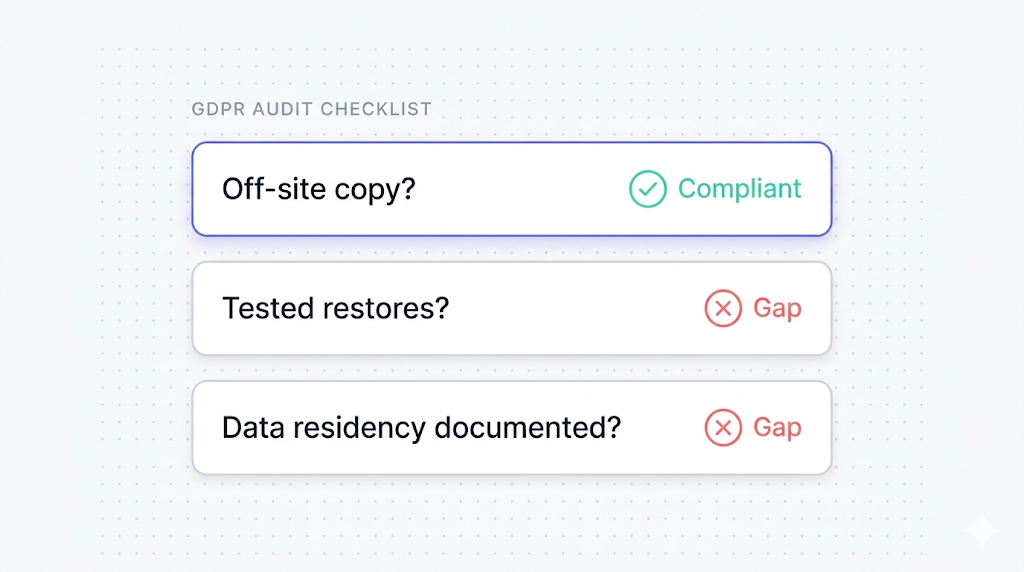
When a GDPR audit covers backup, the questions cluster around three areas.
Do you have an off-site copy? A backup stored in the same region as your primary data can be lost in the same incident that destroys the primary. For personal data that must be restorable "in a timely manner," a single-region backup often doesn't satisfy the risk assessment auditors perform under Article 32.
This is where native backup alone often falls short for compliance scenarios. As covered in what Supabase's native backup doesn't cover, native backups are managed inside Supabase's platform, so an independent copy is something you add yourself.
Do you test your restores? A backup you've never restored is not a backup; it's a promise. Auditors know this. They will ask for evidence of tested restores, usually in the form of a test log or written procedure showing restore frequency and outcome.
Is data residency and transfer documented? If your backup lands outside the EU, you need a legal basis for that transfer. If it stays in the EU, you document that. Either way, you document it.
Where Supabase stores your data and backups
Supabase projects run on AWS. The region you pick when creating the project (e.g., eu-central-1 for Frankfurt, eu-west-1 for Ireland) determines where your project data lives.
The key facts, as documented in the Supabase backups guide:
- Native backups are physical snapshots of the Postgres volume.
- They are managed inside Supabase's platform.
- They are not downloadable.
- Supabase Storage (file objects) is not included in the native snapshot.
- Edge Function source is not included either.
We cover the full architecture in how Supabase native backup works, but the GDPR-relevant summary is this: if your project is in an EU region, your primary data is in the EU. Where your backup copies live is a separate question you answer and document.
Your project's region covers residency for the primary data. An independent off-site copy and documented restore tests are what you add.
| What Supabase provides natively | What you need to add for GDPR readiness |
|---|---|
| Daily Postgres snapshots (Pro+) | Off-site copy in a separate region or provider |
| 7–30 day retention (plan-dependent) | Documented restore tests at regular intervals |
| AES-256 encryption at rest (AWS-managed) | SCCs or adequacy documentation if backup leaves the EU |
| Backups managed by Supabase | Cross-region or cross-provider redundancy |
| Storage backup: none | Separate Storage backup pipeline |
Setting up a GDPR-compliant backup pipeline
A GDPR-compliant Supabase backup setup has three components: an off-site copy of Postgres data, a documented restore test cadence, and (if applicable) a legal basis for any cross-border transfer.
Off-site Postgres backup
The backup needs to land somewhere that isn't the same region as your primary. For GDPR, the simplest path is an EU-based object store: an S3 bucket in eu-central-1, Backblaze B2 in Amsterdam, or Cloudflare R2 with a jurisdiction lock on EU.
The pg_dump route, covered in detail in how to back up Supabase Postgres, gives you a logical backup you can ship to any destination:
pg_dump --host=aws-0-eu-central-1.pooler.supabase.com --port=6543 --username=postgres --format=custom --file=dump-$(date +%F).dump postgres
Pipe that to an S3-compatible upload command and you have an off-site copy. The full guide covers scheduling, encryption flags, and error handling.
For the destination choice and how to document cross-region transfers, cross-region Supabase backup for compliance covers region selection and SCCs in more detail.
Restore test cadence
Article 32 asks for the "ability to restore" in a "timely manner." Auditors interpret this as: have you tested it? Monthly restore tests are the industry-standard cadence. Quarterly is a common minimum. Annual tests are generally not accepted as evidence of a working restore capability.
A test restore doesn't need to be a full production restoration. Restoring a logical dump to a fresh Supabase project and verifying row counts is sufficient evidence.
Keep a test restore log: date, source dump, target project, what was verified, who ran it, and how long the restore took. That log is your audit evidence. A three-row spreadsheet you maintain consistently is more valuable than an elaborate monitoring system you don't use.
Encryption at rest and in transit
Supabase handles encryption at the infrastructure layer:
- At rest: AWS manages AES-256 disk encryption for all Supabase project storage, including native backups.
- In transit: All Supabase connections use TLS. The pooler connections enforce this.
For your off-site backup:
- If you're using
pg_dump --format=custom, the dump file itself is not encrypted by default. Encrypt it before upload. Most object stores support server-side encryption; you can also encrypt locally withgpgbefore shipping. - If you're writing to S3, enable bucket-level SSE-S3 or SSE-KMS and restrict access with IAM policies.
GDPR doesn't mandate a specific encryption standard. It requires "appropriate" measures. AES-256 at rest plus TLS in transit is the accepted baseline; for most use cases, this satisfies the encryption bar under Article 32.
Encrypting your backups satisfies part of the security requirement. It doesn't replace the off-site copy or restore testing. A well-encrypted backup you can't restore is not a compliant backup.
| Layer | What Supabase provides | What you add |
|---|---|---|
| Primary data at rest | AES-256 (AWS-managed) | Nothing required |
| Native backup at rest | AES-256 (AWS-managed) | Nothing required |
| Off-site backup at rest | Depends on destination | SSE at object store, or local gpg encryption |
| Connections in transit | TLS enforced | Nothing required for the connection |
| Off-site backup transfer | TLS on upload (standard) | Ensure your upload client enforces TLS |
Right to erasure and backups (the hard problem)
Article 17 gives data subjects the right to request deletion of their personal data. Backups create a practical problem: if you delete a user from your live database, their data still exists in every backup taken before that deletion.
GDPR acknowledges this tension. Article 17(3)(b) creates an exemption when keeping the data is necessary for "the establishment, exercise or defence of legal claims." Most data retention schedules for backup fall under documented exceptions, but the legal basis has to be documented explicitly.
The practical approach most DPOs accept: maintain a log of erasure requests and the request date. Document that your backup retention policy means backup copies containing that data will expire within your normal retention window (e.g., 30 days for a Pro plan). After that window, the data is gone from backups. This satisfies the spirit of Article 17 without requiring you to scrub individual records from binary dump files.
What you must not do: keep backups indefinitely without a documented retention policy. Indefinite retention with no erasure path is the pattern that creates GDPR exposure. Set a retention window, document it, and enforce it.
Documenting your backup process for an audit
Documentation is where most teams fail GDPR backup audits. The backup works; the paperwork doesn't exist. Three documents you need:
Record of Processing Activities (RoPA) entry: GDPR Article 30 requires a RoPA documenting your data processing activities. Your backup process is a processing activity. The entry should cover: what personal data categories the backup includes, the legal basis for storing them, retention period, storage location with region, and any data processor involved (Supabase, your cloud provider, SimpleBackups if applicable).
Data Processing Agreement (DPA): If a third-party processor stores your backups (Supabase, AWS, any object storage provider), you need a DPA in place. Supabase provides its own DPA. Verify it covers the data you're backing up and the storage locations you're using.
Restore test log: Date, source dump, target environment, what was verified, duration. Automate the verification step so the log entry is accurate, as described in automating Supabase backup verification.
| Document | What it covers | Updated when |
|---|---|---|
| RoPA entry for backups | Data categories, legal basis, retention, storage location | On any backup configuration change |
| DPA with Supabase | Supabase as data processor | On Supabase plan change or DPA update |
| DPA with backup storage provider | AWS S3, Backblaze, etc. as sub-processor | On provider change |
| Restore test log | Tested restores with date, outcome, duration | After each test (monthly or quarterly) |
| Data transfer basis | SCCs or adequacy decision if backup leaves EU | On destination change |
| Erasure request log | Requests with date and retention window expiry | On each erasure request |
What to do next
If you don't have a documented backup process at all, start there. Create the RoPA entry for your backup, run a single restore test and log the result, and verify that your Supabase project region matches what your DPAs say.
If you already have a process but it's single-region, set up an off-site copy before your next audit cycle. A pg_dump to an EU object store, running on a cron schedule, is a morning's work.
The gap auditors cite most often isn't missing encryption or the wrong storage region. It's missing evidence: no restore test log, no RoPA entry, no DPA with the object storage provider. The backup exists; the paper doesn't. Fix the paper first.
SimpleBackups for Supabase complements Supabase's native backups. If you want off-site Postgres backups, automated restore verification, and a structured documentation trail without writing any of it yourself, that's what it does.
Keep learning
- How Supabase native backup works: architecture, retention windows, and what a physical snapshot actually covers
- What Supabase native backup doesn't cover: the gaps that matter for compliance
- Automating Supabase backup verification: building a restore test process you can actually document
- Cross-region Supabase backup for compliance: region selection, SCCs, and the destination decision
- How to back up Supabase Postgres: the manual path with
pg_dump, scheduling, and off-site upload
FAQ
Does GDPR require backups to be stored in the EU?
No. GDPR requires protection of personal data and the ability to restore it after an incident, not EU-only storage. Transfers outside the EU require a legal basis such as an adequacy decision or Standard Contractual Clauses, but the backup location itself is not mandated.
How do I handle right-to-erasure requests in backups?
Document the erasure request date and note that backup copies will expire within your normal retention window. GDPR allows a grace period equal to your retention window when that retention is documented and enforced, so you don't need to scrub individual records from binary backup files.
Is Supabase's native backup GDPR-compliant?
It depends on your context. Native backups use strong encryption and run in your project's region, but they are not off-site, don't cover Storage file objects, and have no built-in restore testing. Whether that satisfies your compliance requirements depends on your data categories and your DPO's assessment.
What documentation do I need for a GDPR backup audit?
A Record of Processing Activities entry for your backup, a Data Processing Agreement with Supabase and any storage provider, a restore test log showing regular tested restores, and SCCs or an adequacy decision if backup leaves the EU.
Does encrypting backups satisfy GDPR requirements?
Encryption satisfies the Article 32 security requirement but not the restore capability requirement or data residency documentation. A compliant backup needs to be encrypted, stored off-site, and regularly tested.
Can I store Supabase backups on AWS S3 in the US and still be GDPR-compliant?
Yes, with SCCs in place. AWS provides EU SCCs for its services. You need to include the transfer in your RoPA and ensure your DPA with AWS reflects the cross-border transfer. Many teams use US regions for backup storage and remain compliant through documentation.
How often should I test restores for GDPR compliance?
GDPR doesn't specify a frequency, but auditors expect evidence of testing. Monthly is the industry-standard cadence; quarterly is the accepted minimum. Annual tests are generally not accepted as sufficient evidence of a working restore capability.
This article is part of The complete guide to Supabase backup, an honest, practical reference from the team that backs up Supabase every day.