
Appearance
Backup Recovery & Compliance Board
Compliance and disaster recovery dashboard for your backups
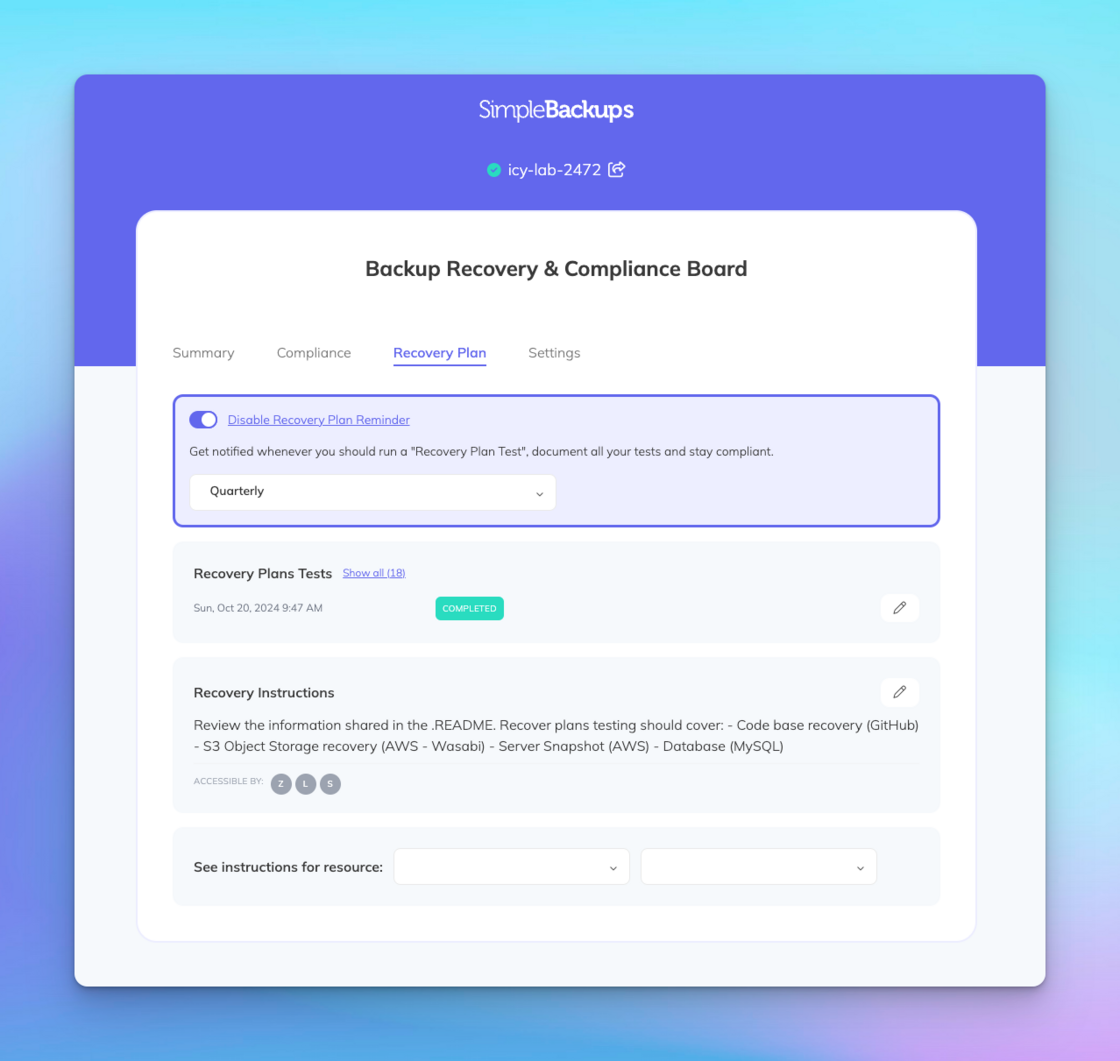
The Backup Recovery & Compliance Board in SimpleBackups serves as a centralized hub for managing, monitoring, and auditing your backup operations. It provides a comprehensive overview of your backup ecosystem, ensuring transparency and control over your data protection strategies.
Key Features
- Audit Logs: Track all activities related to your backups, including settings changes, access modifications, and other critical actions. This feature enhances transparency and accountability within your team.
- Compliance Monitoring: Stay aligned with industry standards and regulations by maintaining detailed records of backup activities. The board aids in demonstrating compliance during audits and assessments.
- Recovery Management: Efficiently manage your disaster recovery plans by having immediate access to backup statuses and restoration options, ensuring rapid response in case of data loss incidents.
By consolidating these functionalities into a single interface, the Backup Recovery & Compliance Board empowers you to maintain robust data protection practices, streamline recovery processes, and uphold compliance requirements effectively.
Recovery plan
Each Project has a Recovery Plan tab on its Compliance Board. It holds your written recovery instructions, the schedule for testing them, and the history of every recovery plan test. Frameworks such as ISO 27017 and SOC2 expect you to rehearse restores regularly, and this tab is where you keep the record.
Recovery instructions
Under Recovery Instructions, click the pencil icon, describe how your team restores this Project's data, and click Save Note. The same instructions are the recovery note you can set when creating a Project.
Below the instructions, See instructions for resource lets you pick one of the Project's backups and one of its runs. SimpleBackups then shows the restore options for that run, so you can follow your plan against a real backup.
Recovery plan tests
A recovery plan test is a dated entry confirming that your team rehearsed the recovery plan. SimpleBackups does not run the restore for you: it reminds you when a test is due, and you record the outcome after performing it.
To schedule reminders, open the Recovery Plan tab, check Receive Recovery Plan Reminders, and pick a schedule:
- Monthly: on the 1st of every month.
- Quarterly: on the 1st day of each quarter (January, April, July, October).
- Yearly: on January 1st.
Reminders go out at 08:00 UTC. Select None to stop them.
On each scheduled date, SimpleBackups adds a new test with the status Not Completed to the Recovery Plans Tests list and emails your Team contact email (Settings → Team profile), or the Team Owner's email if none is set. The email links to your recovery instructions and to the test itself.
Record a test result
After you perform the test, open it from the email or click the pencil icon next to it in the Recovery Plans Tests list. In the Recovery Plan Test dialog, fill in:
- Tested At (required): when you performed the test, in your Team's timezone.
- Note: what you restored, how long it took, and anything that went wrong.
- Status (required): Completed or Not Completed.
Click Save Test. The list shows the most recent test first; click Show all to see the full history.
Test status on the Compliance tab
The Compliance tab summarizes your testing under Backup Recovery Plan Testing, in both the ISO 27017 and SOC2 sections. It shows the Testing Schedule and a Testing Status of No Tests Found, All Completed, or the number of tests not completed. Guests you share the Project with can see this summary, which gives auditors evidence of your testing without access to your account.
Teams, Projects & UsersCreate Projects and share their compliance sheet with guests.Backup RestoreRestore a backup when you run a recovery plan test.