
Appearance
CEPH
Steps to connect your CEPH storage to SimpleBackups
How to connect your CEPH bucket to SimpleBackups as a storage
- Go to Create Storage — SimpleBackups.com Local page.
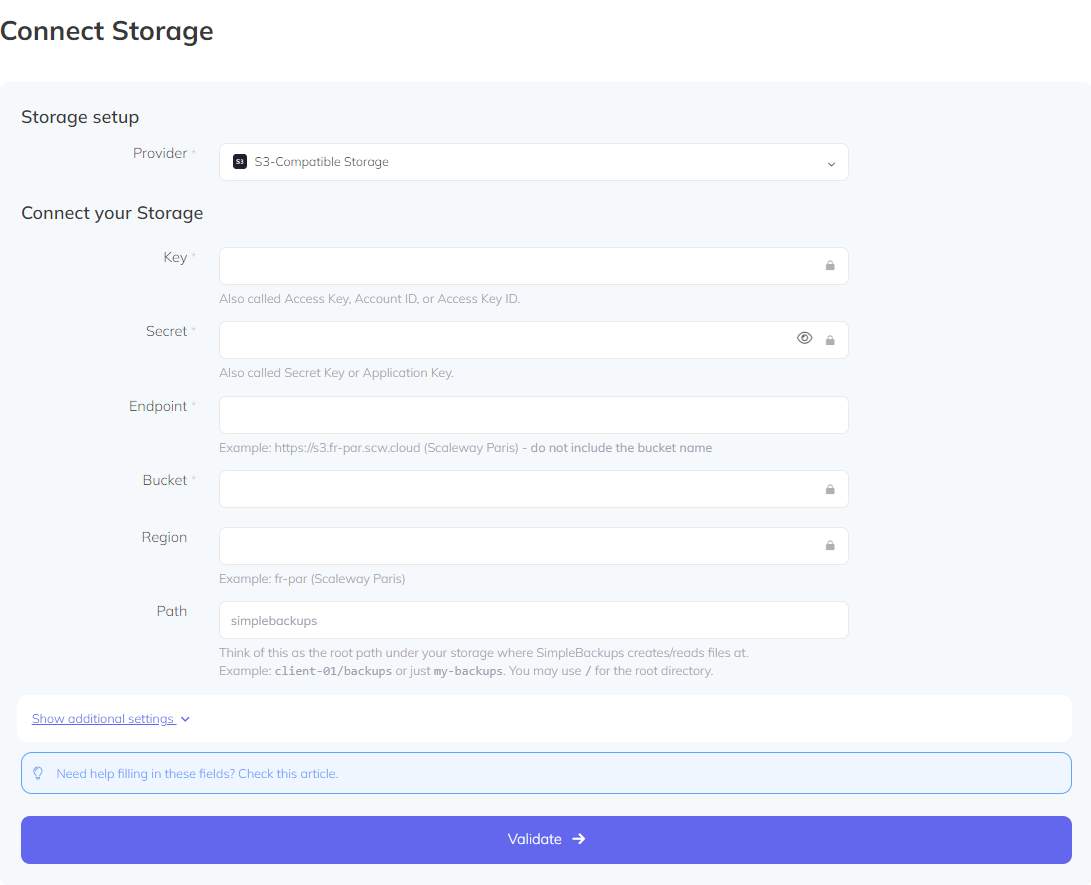
- Choose S3-Compatible Storage as provider.
- Fill the form with the storage credentials:
- Key ⇒ Access Key for storage.
- Secret ⇒ Access Secret for storage.
- Endpoint ⇒ Endpoint URL you have from your storage provider.
- Bucket ⇒ The bucket name you want to connect to.
- Region ⇒ The region your bucket resides [also you can leave empty or enter ‘auto’].
- Path ⇒ The folder path inside the bucket you are willing to use to store your backups.
- Click on Validate.
- Choose a name for your storage then click Save Storage.
Notes
- Consider to give the required policy permissions to your bucket [follow AWS S3].
- Currently we support https://pawsey.org.au as CEPH storage provider so your Endpoint will be like
https://[some-domain].pawsey.org.auIf you use another CEPH storage provider feel free to contact us to help you connect your storage.
See also: IONOS, SimpleBackups IP addresses (firewall).